british gas

British Gas agent tool

3 months

London & remote

british gas

British Gas agent tool

3 months

London & remote

british gas

British Gas agent tool

3 months

London & remote

Overview

As part of a 12 week engagement with Centrica, we were tasked with improving the overall usability of their internal (Salesforce) tool used by service agents, with the aim of reducing average call times and repeat calls, while simultaneously increasing the first-call solution rate. As UX lead on this project, my role was to assist in the research process, derive key insights and then drive the high level design of a better tool, to then be handed over to Centrica’s SF consultants to be produced and shipped.

Highlights

Task completion time

69%

Clicks needed

83%

Agents preferring the tool

100%

Project summary

Aims

A better facilitated customer support journey for Centrica agents.

Reduced repeat contacts and contact duration.

Increased end customer satisfaction.

Aims

A better facilitated customer support journey for Centrica agents.

Reduced repeat contacts and contact duration.

Increased end customer satisfaction.

Aims

A better facilitated customer support journey for Centrica agents.

Reduced repeat contacts and contact duration.

Increased end customer satisfaction.

Limiting factors

Limited functionality in Salesforce, not best practice.

Tools do not talk to each other.

Agents reportedly resistant to behaviour change.

Limiting factors

Limited functionality in Salesforce, not best practice.

Tools do not talk to each other.

Agents reportedly resistant to behaviour change.

Limiting factors

Limited functionality in Salesforce, not best practice.

Tools do not talk to each other.

Agents reportedly resistant to behaviour change.

Pains

Agents currently use multiple disparate tools, leading to high levels of inertia, slower triages and general frustration.

Some tasks especially (e.g. identification and verification) are unnecessarily long.

Pains

Agents currently use multiple disparate tools, leading to high levels of inertia, slower triages and general frustration.

Some tasks especially (e.g. identification and verification) are unnecessarily long.

Pains

Agents currently use multiple disparate tools, leading to high levels of inertia, slower triages and general frustration.

Some tasks especially (e.g. identification and verification) are unnecessarily long.

Deliverables

Insights and recommendations for new functionality based on research.

Insights and recommendations for new functionality based on research.

Insights and recommendations for new functionality based on research.

Roadmap for Salesforce implementation of new features.

Roadmap for Salesforce implementation of new features.

Roadmap for Salesforce implementation of new features.

High level designs leveraging Salesforce Sales Cloud functionality.

High level designs leveraging Salesforce Sales Cloud functionality.

High level designs leveraging Salesforce Sales Cloud functionality.

Final

Designs

the goal

Enable service agents to better help customers through a reimagined Salesforce tool.
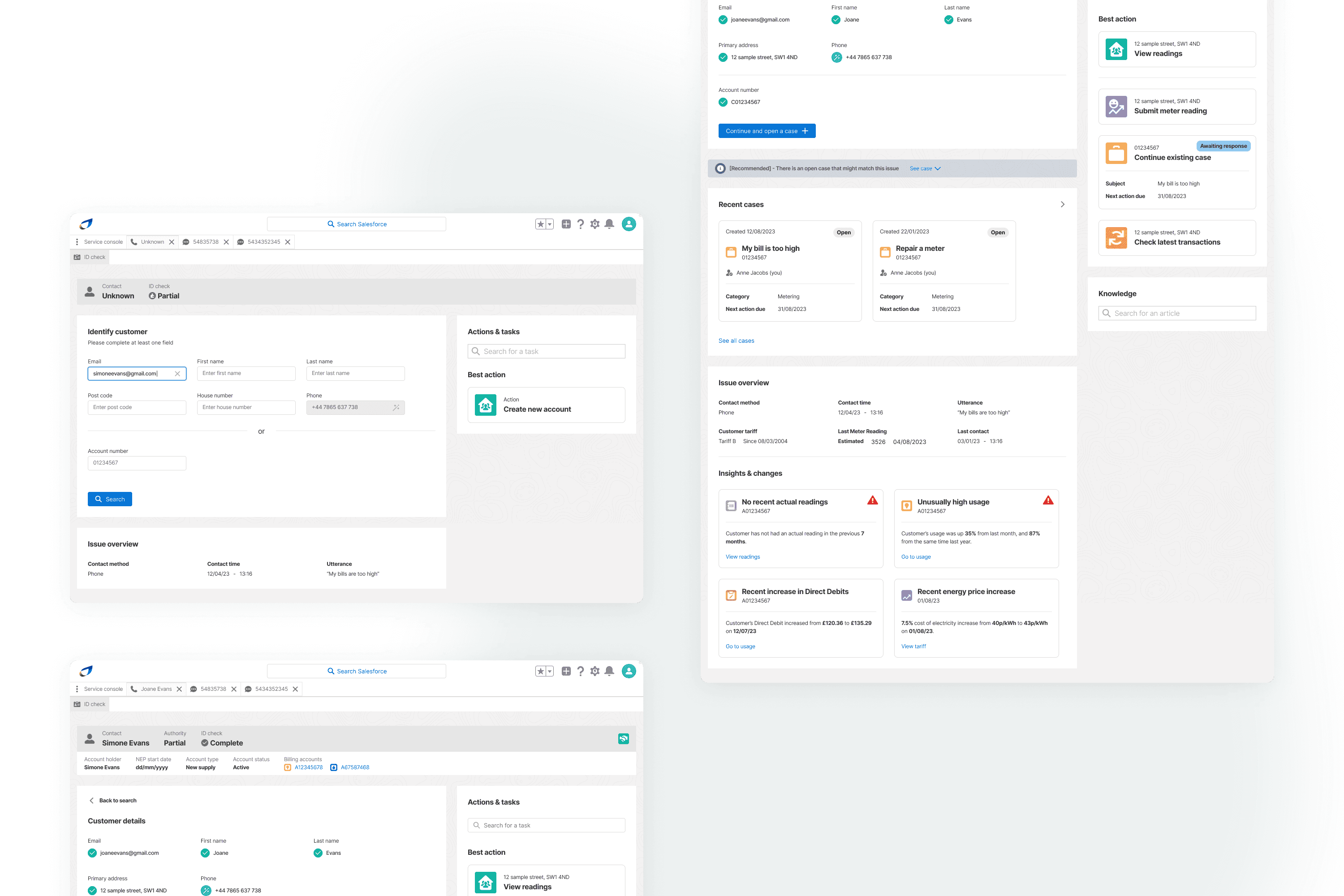
Chapter 1

Opening scope

3 areas of focus

As part of this wider aim, our workstream was set up to specifically target the portion of the wider customer experience that did involve direct engagement with a service agent, by targeting the agent-side tool as a necessary component driving this experience. We scoped the following 3 agent journeys to focus on:

01

Identification & verification (IDV)

Streamline and sequence repetitive tasks that help an agent identify the customer account and surface potential reasons for the contact, prior to actually engaging the customer.

02

Billing issues

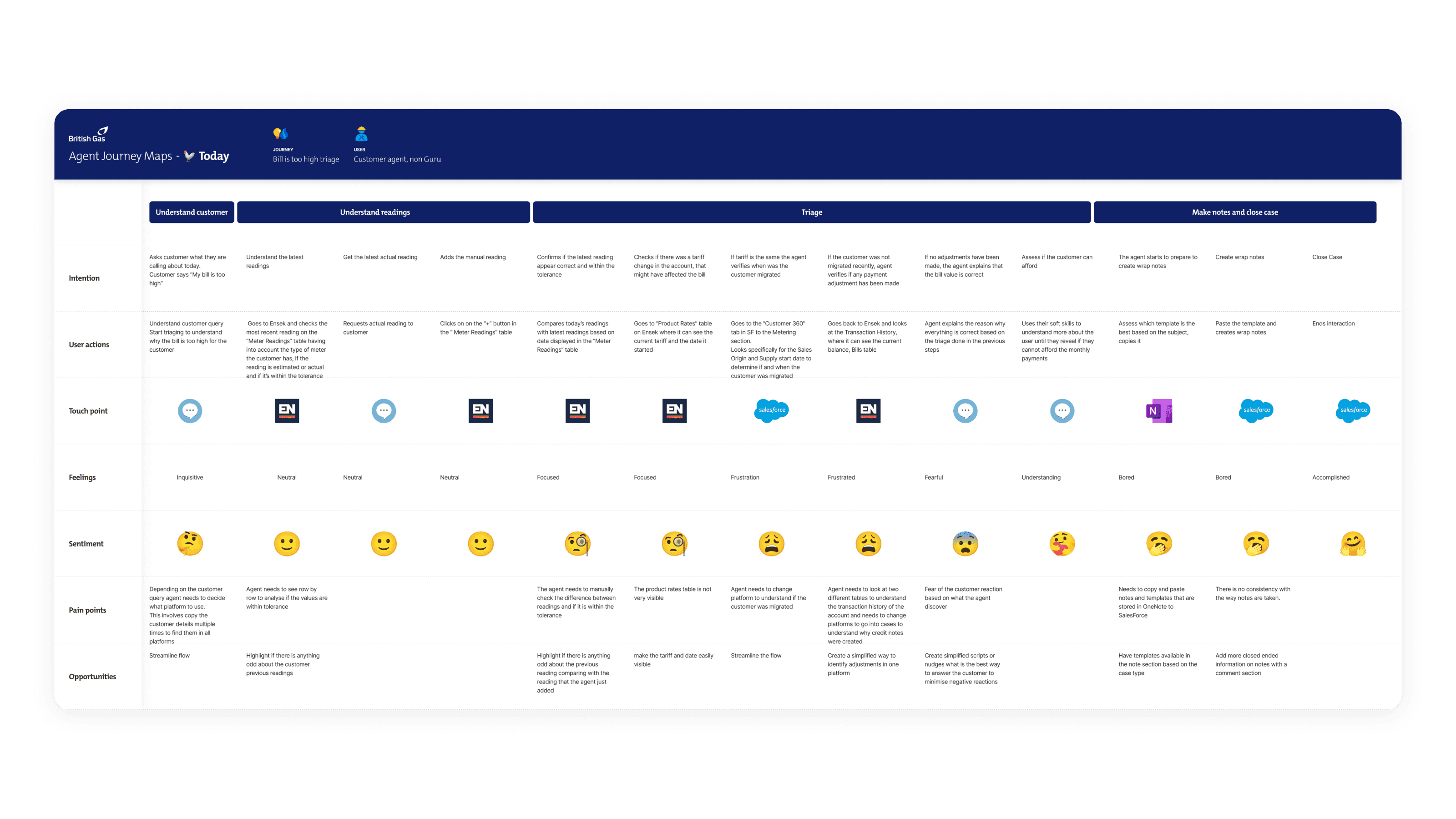
Design the optimal approach to handling billing issues in Salesforce, centred around the journey of a customer contacting about a bill increase.

03

Metering issues

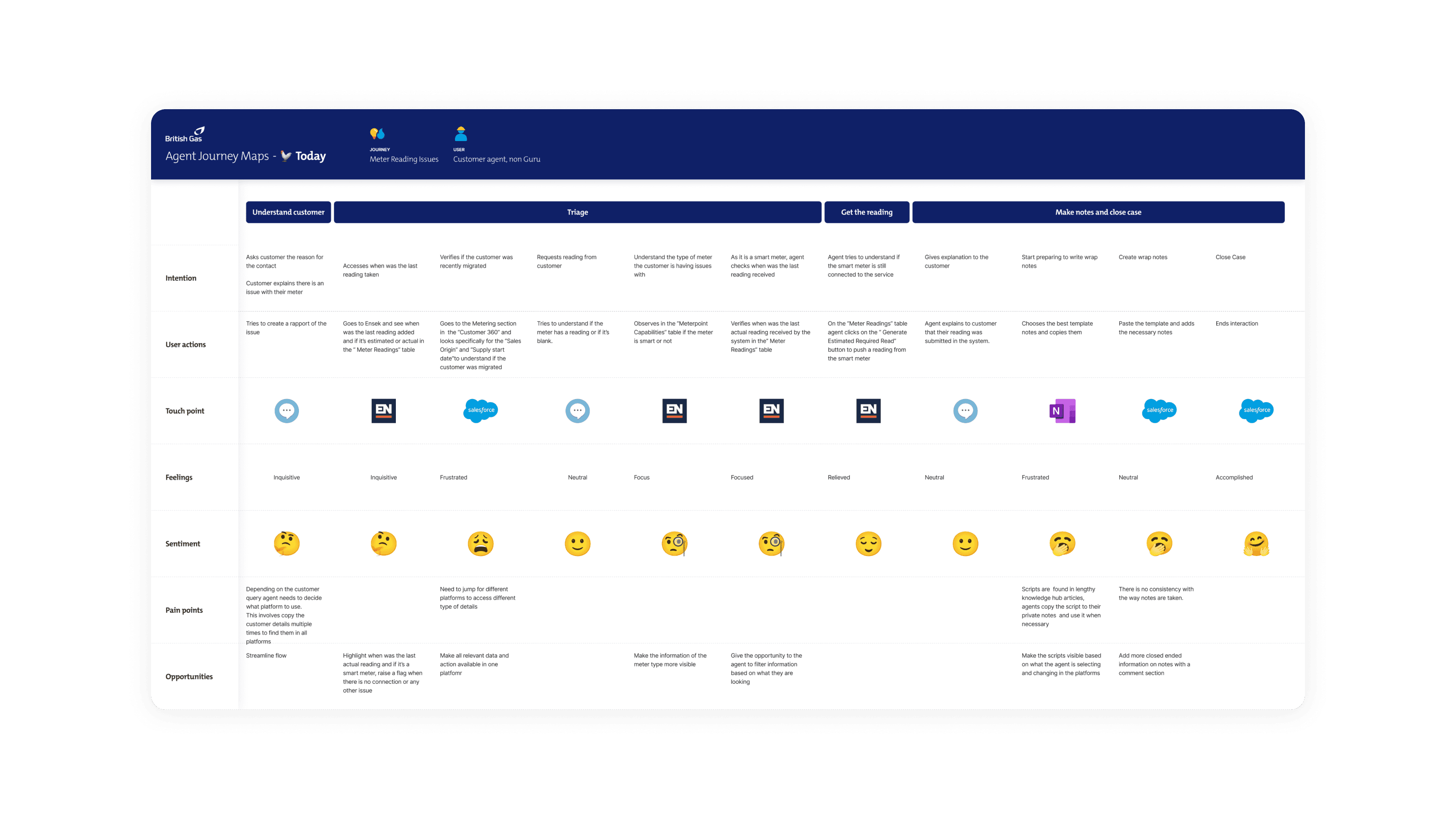
Design the optimal approach to diagnosing and handling metering issues in Salesforce, centred around an agent diagnosing an issue with a customer’s meter and requesting the customer submit a meter reading.

Our goal is to drastically simplify the customer support journey for Centrica agents. By identifying the best tool for the job at every step of the way and focusing intensely on how to make that tool work for the agent, we can free the agents to focus on what matters most – the customer.

When agents have a toolset that provides consistency, ease of use, and surfaces relevant information at the right time, they can serve the customer with empathy, ensuring Centrica customers are delivered the level of support they deserve.

The timeline

Chapter 2

initial Research

12

Hours of silent observations

20

Moderated interviews

5

Journeys mapped

Agent shadowing

We spent a week continuously shadowing agents to see exactly how they worked through challenges and solved customers' problems. We carefully mapped their decision points, key pains and primary areas of friction throughout.

Shadowing

Interviews

SMEs

Shadowing

Agent shadowing

We spent a week continuously shadowing agents to see exactly how they worked through challenges and solved customers' problems. We carefully mapped their decision points, key pains and primary areas of friction throughout.

Shadowing

Interviews

SMEs

Shadowing

Agent shadowing

We spent a week continuously shadowing agents to see exactly how they worked through challenges and solved customers' problems. We carefully mapped their decision points, key pains and primary areas of friction throughout.

Shadowing

Interviews

SMEs

Shadowing

Pain point findings

There were multiple aspects of the current agent tool that created inertia and overcomplicated the process for agents, that extended beyond simply the journeys of billing or metering issues.

Unnecessary task switching

Agents had to switch back and forth between Salesforce and their billing & metering tool, Ignition, which held all customer meter info.

Case inefficiencies

There were too many empty open cases, which led to confusion and significant duplications of work.

Case inefficiencies

There were too many empty open cases, which led to confusion and significant duplications of work.

Case notes are a pain

Creating notes added huge overheads to each case, and so either increased the effort or were ignored, leading to complications down the line.

Case notes are a pain

Creating notes added huge overheads to each case, and so either increased the effort or were ignored, leading to complications down the line.

Case notes are a pain

Creating notes added huge overheads to each case, and so either increased the effort or were ignored, leading to complications down the line.

Poor supporting literature

Knowledge hub (SF’s supporting articles) did not surface the information needed at the right time.

Guided journeys not optimised

Guided journeys were useful pieces of functionality but it was not clear when they should be used.

Poor workflow & task notifications

Notifications were inconsistent and did not provide useful next actions when surfaced.

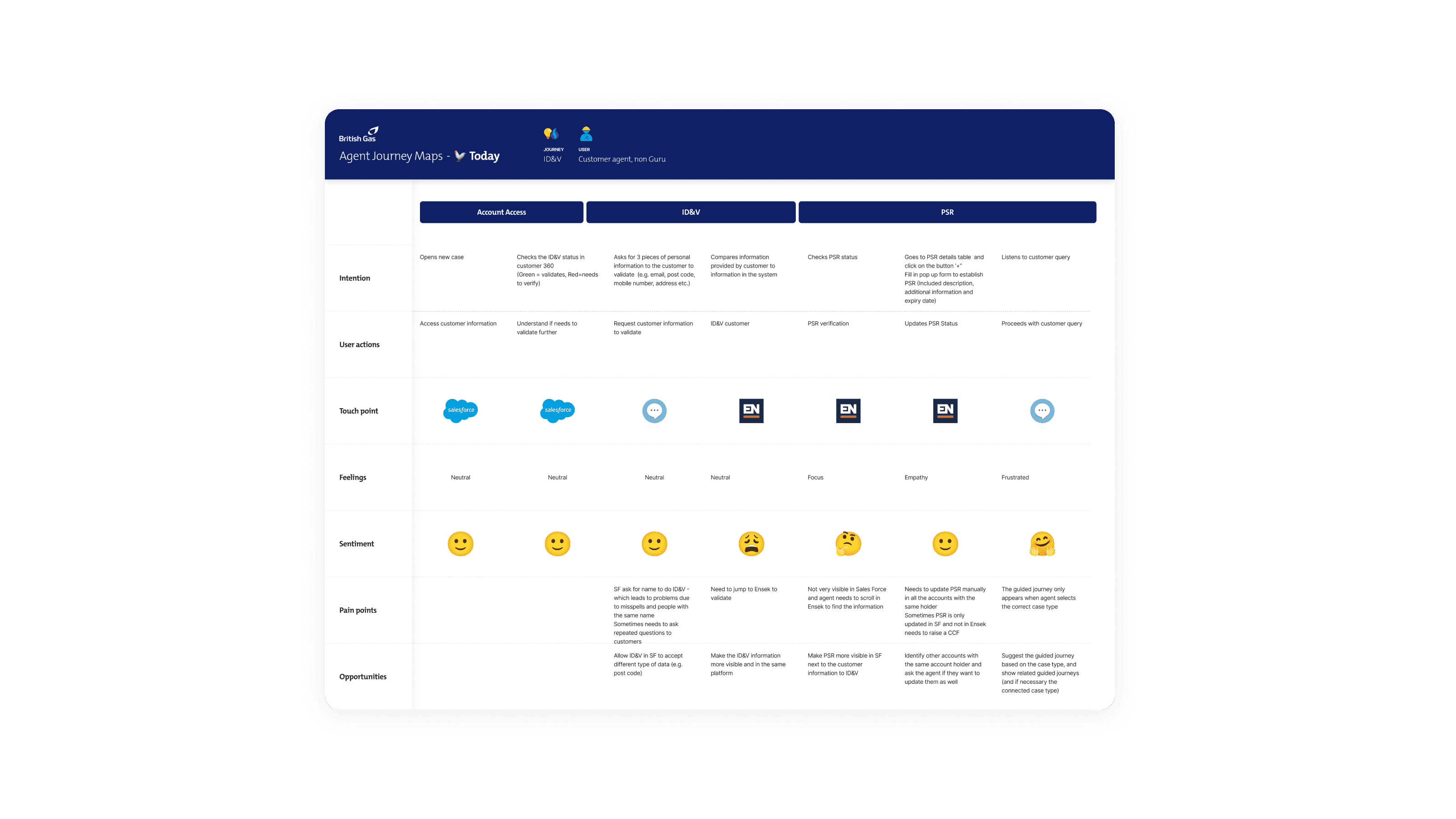
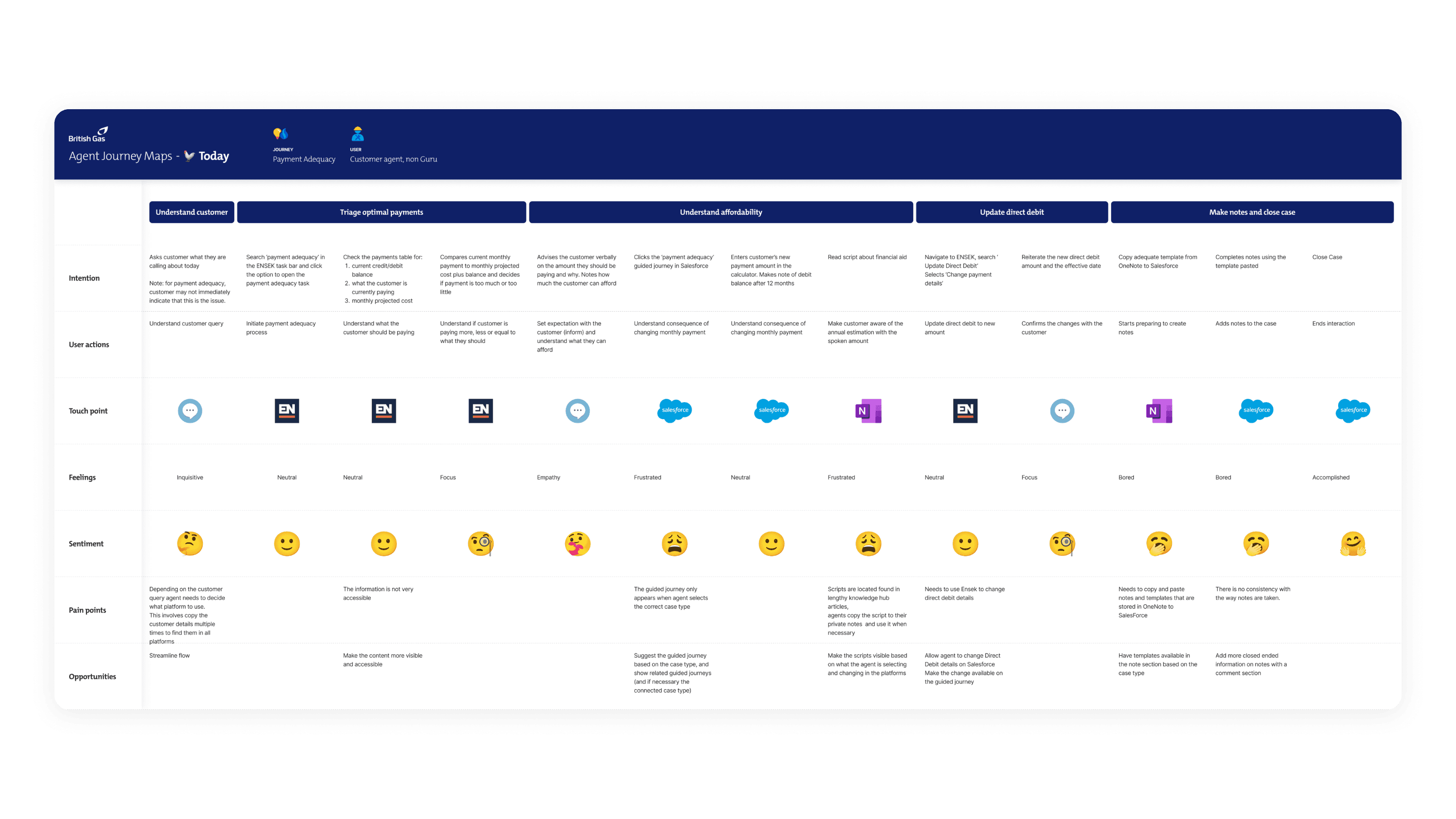
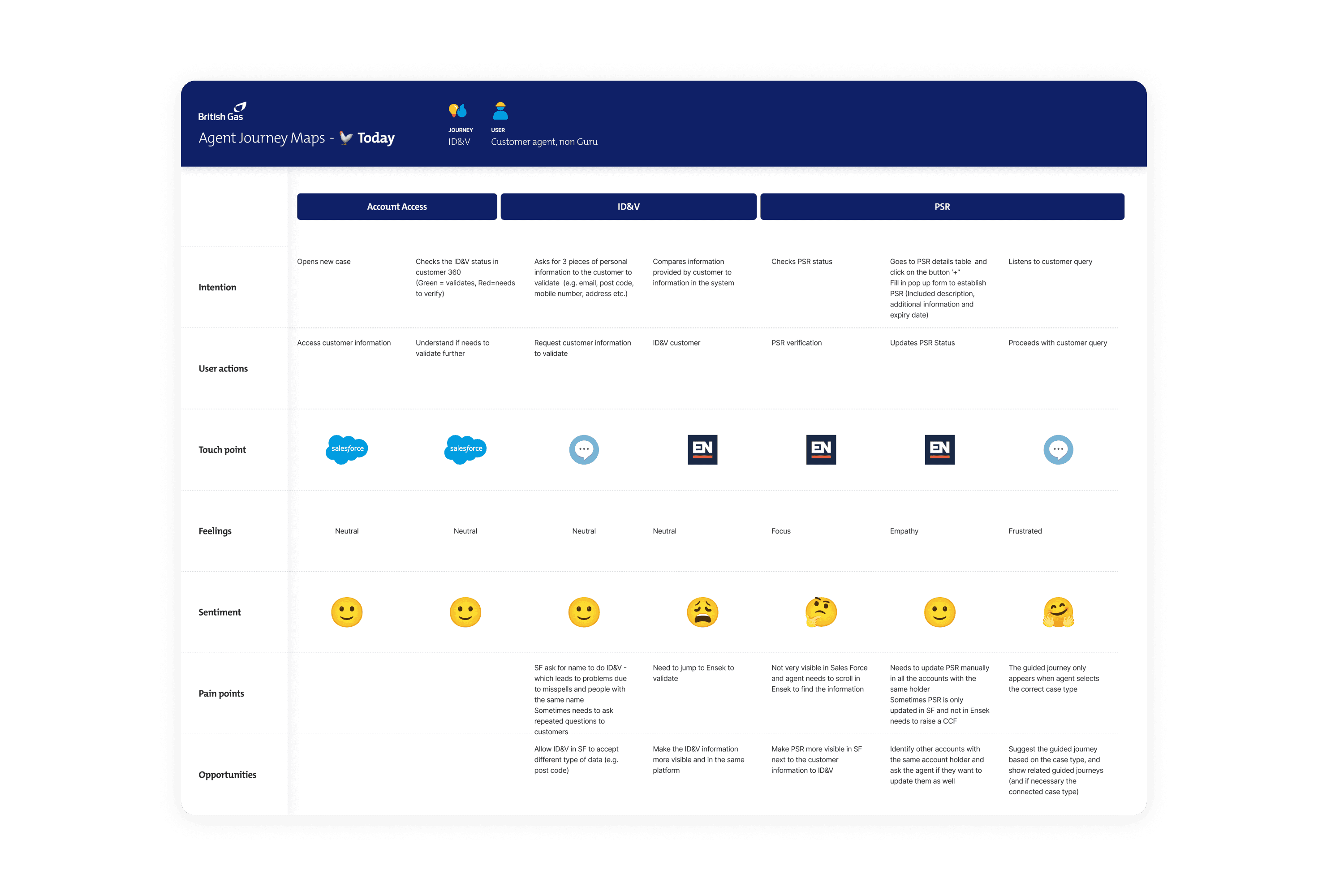
Journey maps

We first mapped out the journeys for the key focus areas through a combination of user interviews, SME interviews and exploration of the Salesforce and ENSEK stools used by agents.
Chapter 3

streamlined customer ID

69%

Decrease in time to completion

100%

Of agents preferred the new method

83%

Fewer clicks

A new, faster way to verify customers.

We totally revamped the process of identifying and validating customers, which was the very first task that agents would do in every call. After hours of agent interviews and observations, we designed a whole new ID process based around the following significant features:
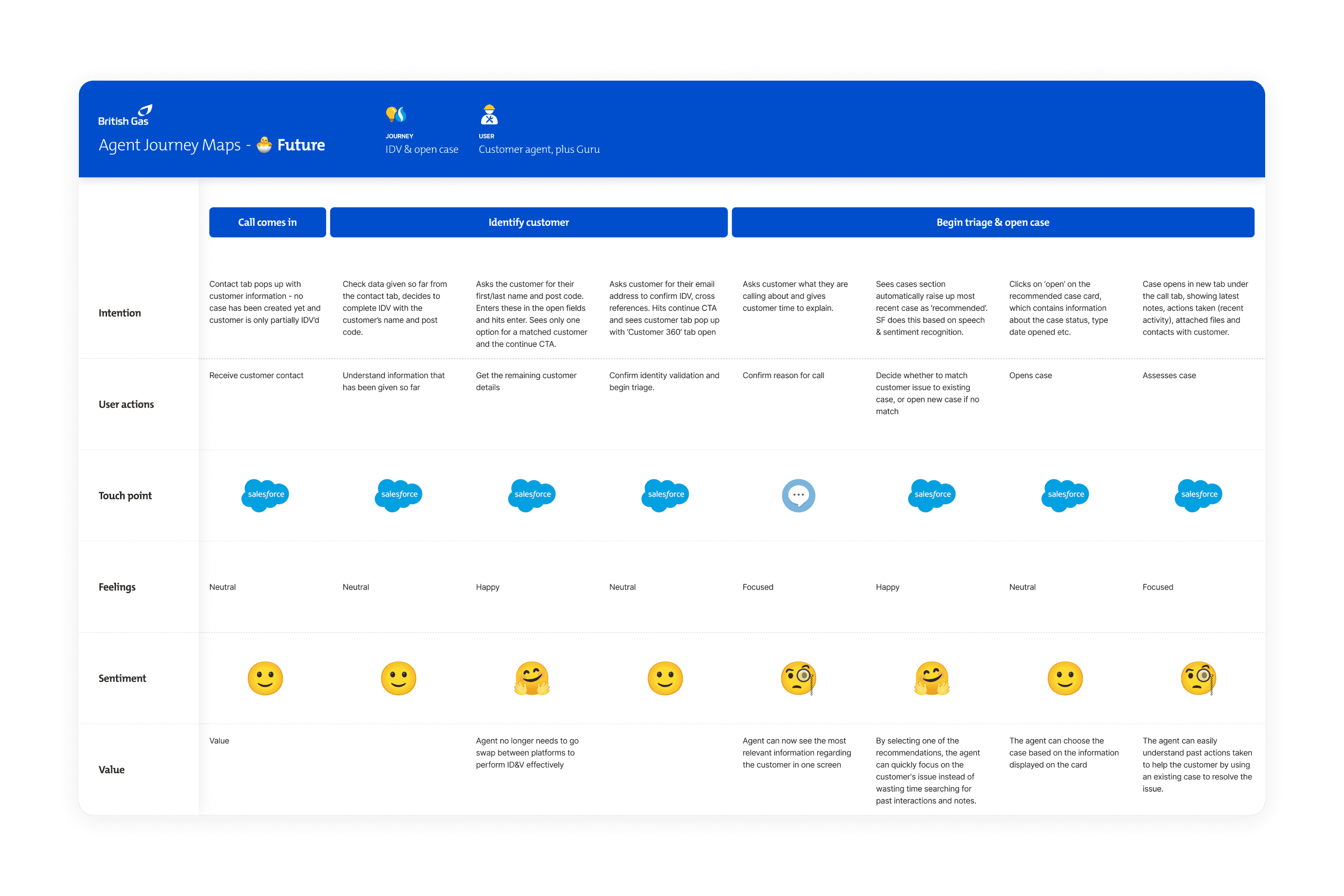
Salesforce would automatically detect and pull in any available customer information generated before the interaction began (e.g. entered through chat or in the pre-queue).

Salesforce would automatically detect and pull in any available customer information generated before the interaction began (e.g. entered through chat or in the pre-queue).

Salesforce would automatically detect and pull in any available customer information generated before the interaction began (e.g. entered through chat or in the pre-queue).

The agent could validate the customer through any number of fields, rather than just the Account Number which had to be obtained manually from ENSEK Ignition.

The agent could validate the customer through any number of fields, rather than just the Account Number which had to be obtained manually from ENSEK Ignition.

The agent could validate the customer through any number of fields, rather than just the Account Number which had to be obtained manually from ENSEK Ignition.

A completely reimagined customer details page that included previous cases and recommendations for next actions.

A completely reimagined customer details page that included previous cases and recommendations for next actions.

A completely reimagined customer details page that included previous cases and recommendations for next actions.

An issue overview widget that pulled in contextual information using Salesforce's new AI capabilities.

An issue overview widget that pulled in contextual information using Salesforce's new AI capabilities.

An issue overview widget that pulled in contextual information using Salesforce's new AI capabilities.

Tab 1 of 2: Before
IDV Before
  1. Case opens in Salesforce.

  1. Switch to Ignition.

  1. Ask for customer details (either email address, postal address or account number).

  1. Enter details in Ignition and search.

  1. Locate consumer account number.

  1. Switch back to SF and enter account number.

  1. Assign customer to case.

  1. Add case details and continue.

Tab 1 of 2: Before
IDV Before
  1. Case opens in Salesforce.

  1. Switch to Ignition.

  1. Ask for customer details (either email address, postal address or account number).

  1. Enter details in Ignition and search.

  1. Locate consumer account number.

  1. Switch back to SF and enter account number.

  1. Assign customer to case.

  1. Add case details and continue.

Tab 1 of 2: Before
IDV Before
  1. Case opens in Salesforce.

  1. Switch to Ignition.

  1. Ask for customer details (either email address, postal address or account number).

  1. Enter details in Ignition and search.

  1. Locate consumer account number.

  1. Switch back to SF and enter account number.

  1. Assign customer to case.

  1. Add case details and continue.

Key benefits

Customer continuity

Identified customer information can be parsed through to the initial IDV screen in SF, potentially removing one step entirely.

Better customer service

Customer utterance can be used to generate recommended actions for the agent allowing them to focus on building customer rapport, rather than troubleshooting.

Better customer service

Customer utterance can be used to generate recommended actions for the agent allowing them to focus on building customer rapport, rather than troubleshooting.

Greater reliability

No reliance on Ignition, which often crashes and creates frustration for both the agent & customer, as shown in our research.

Greater reliability

No reliance on Ignition, which often crashes and creates frustration for both the agent & customer, as shown in our research.

Greater reliability

No reliance on Ignition, which often crashes and creates frustration for both the agent & customer, as shown in our research.

Chapter 4

Redesigned cases

01

Simplified case structure

Over a period of 6 weeks (alongside designing other features) we formulated a brand new case and object structure. This feature formed potentially the largest overall revision to the tool.

Case structure before

Tabs in the tool sat across two levels high a high amount of repetition. Cases for example could exist as a top level tab with several other objects below it, or beneath other cases in a strange sort of infinite loop. This often led to confusing and highly inconsistent tab structures with no clear object hierarchy.

New cases would be opened automatically with every inbound customer contact.

New cases would be opened automatically with every inbound customer contact.

New cases would be opened automatically with every inbound customer contact.

Agents had to search for a customer in a separate platform (ENSEK Ignition), copy their details back into SF and assign the customer to the new case.

Agents had to search for a customer in a separate platform (ENSEK Ignition), copy their details back into SF and assign the customer to the new case.

Agents had to search for a customer in a separate platform (ENSEK Ignition), copy their details back into SF and assign the customer to the new case.

Cases occupied the upper tab level of a 2-tier tab system, with customer details (or sometimes even other cases) sitting below them on the lower level.

Cases occupied the upper tab level of a 2-tier tab system, with customer details (or sometimes even other cases) sitting below them on the lower level.

Cases occupied the upper tab level of a 2-tier tab system, with customer details (or sometimes even other cases) sitting below them on the lower level.

Non case-related customer information is found primarily under the case itself, duplicating information on customer details pages.

Non case-related customer information is found primarily under the case itself, duplicating information on customer details pages.

Non case-related customer information is found primarily under the case itself, duplicating information on customer details pages.

Case structure after

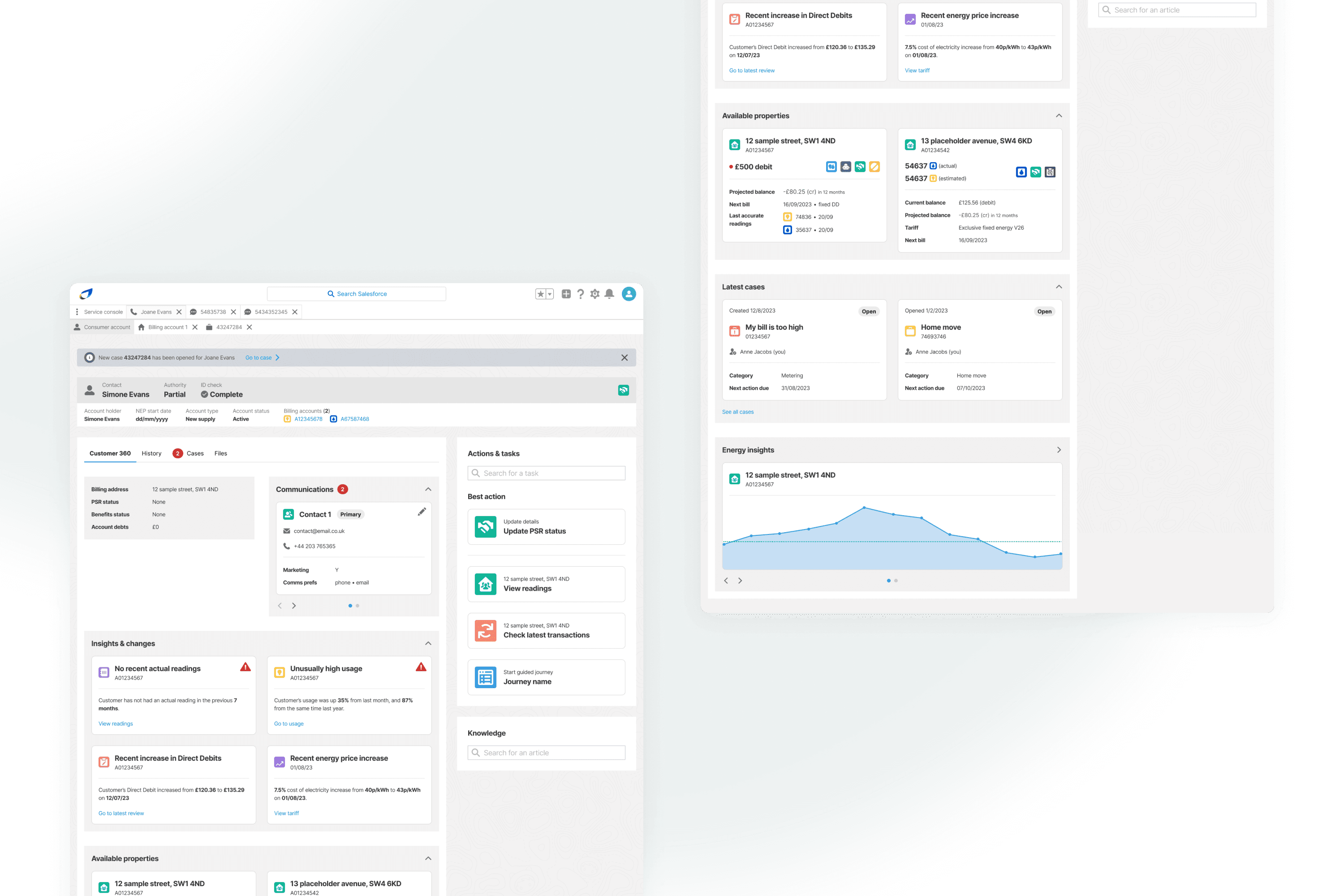
We updated cases to follow a new tab model. Cases no longer existed at the top level, now having to be tied to a specific consumer account. The new top tab was reimagined as the Incoming contact/Consumer account tab (the former for during a contact and the latter for outside of a call or message). Beneath this, there could only exist 3 possible objects: A consumer/customer, a service address (billing account) or a case.
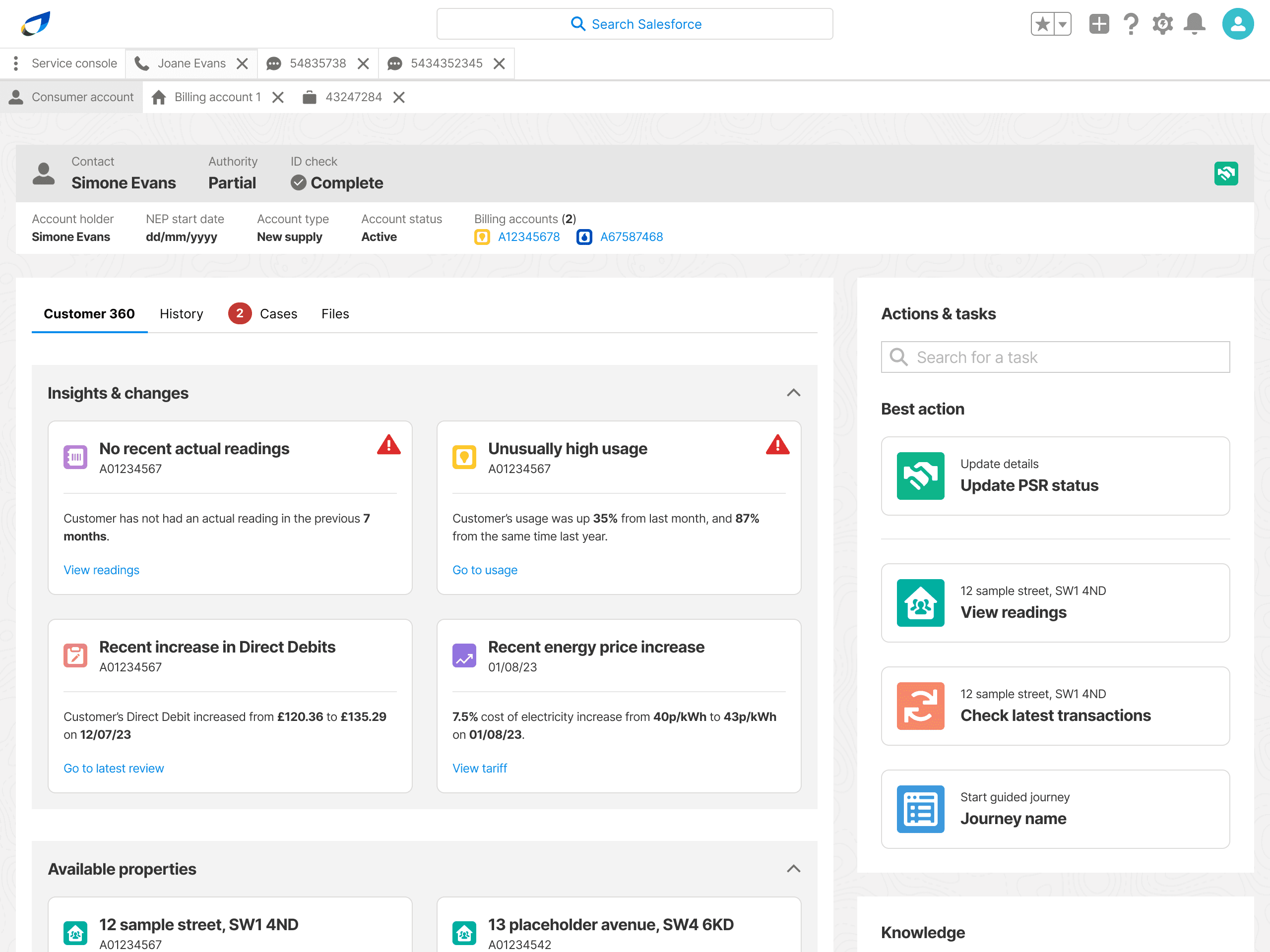
Inbound customer contacts first require the customer ID&V, after which the agent has the option to open a new case OR a recommended existing case.

Inbound customer contacts first require the customer ID&V, after which the agent has the option to open a new case OR a recommended existing case.

Inbound customer contacts first require the customer ID&V, after which the agent has the option to open a new case OR a recommended existing case.

Cases always sit in the lower level of the 2-tier tab system, under either a customer account or contact at the upper level.

Cases always sit in the lower level of the 2-tier tab system, under either a customer account or contact at the upper level.

Cases always sit in the lower level of the 2-tier tab system, under either a customer account or contact at the upper level.

Exiting a case tab or closing a case automatically prompts the agent to complete notes.

Exiting a case tab or closing a case automatically prompts the agent to complete notes.

Exiting a case tab or closing a case automatically prompts the agent to complete notes.

Cases are always opened against an action that would require one (even if it just taking a note), otherwise no case is created.

Cases are always opened against an action that would require one (even if it just taking a note), otherwise no case is created.

Cases are always opened against an action that would require one (even if it just taking a note), otherwise no case is created.

02

New case creation journey

The creation of new cases was a huge overhead for agents, who had to complete 30+ fields in a single page form when opening any new case. This was problematic for a number of reasons:
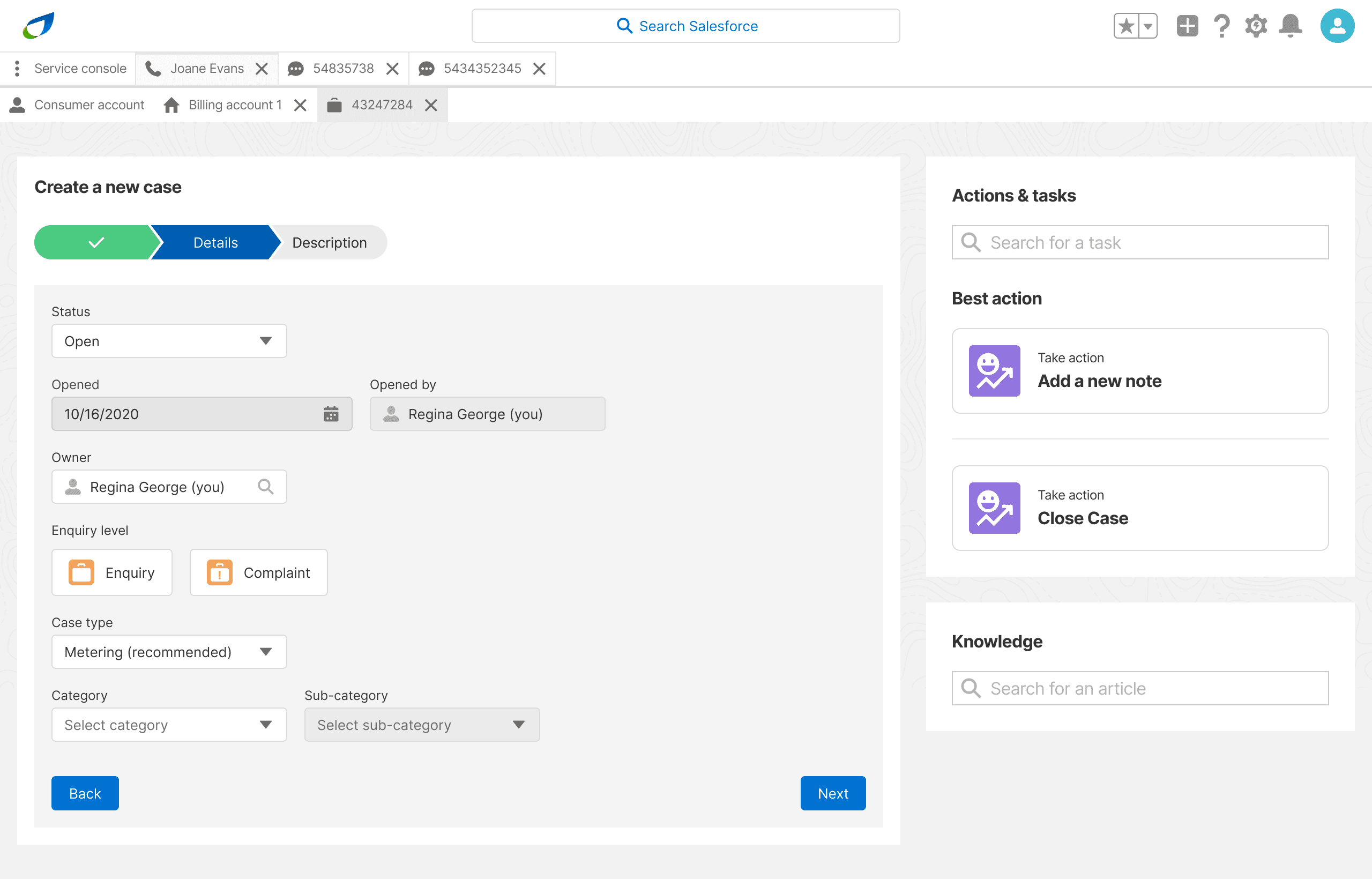
Numerous duplicated and redundant fields.

Numerous duplicated and redundant fields.

Numerous duplicated and redundant fields.

Agents had to search for a customer in a separate platform (ENSEK Ignition), copy their details back into SF and assign the customer to the new case.

Agents had to search for a customer in a separate platform (ENSEK Ignition), copy their details back into SF and assign the customer to the new case.

Agents had to search for a customer in a separate platform (ENSEK Ignition), copy their details back into SF and assign the customer to the new case.

No logical chunking of form completion.

No logical chunking of form completion.

No logical chunking of form completion.

No smart pre-population.

No smart pre-population.

No smart pre-population.

Redesign v.1

So we redesigned the case creation journey to better guide agents through the process, removing duplicated fields and better grouping them into multiple pages after an in-depth, SME-driven analysis of the existing form.

The result was a much more manageable process that brought in existing information, either from the ID&V process or customer utterances, to pre-populate as many fields as possible.
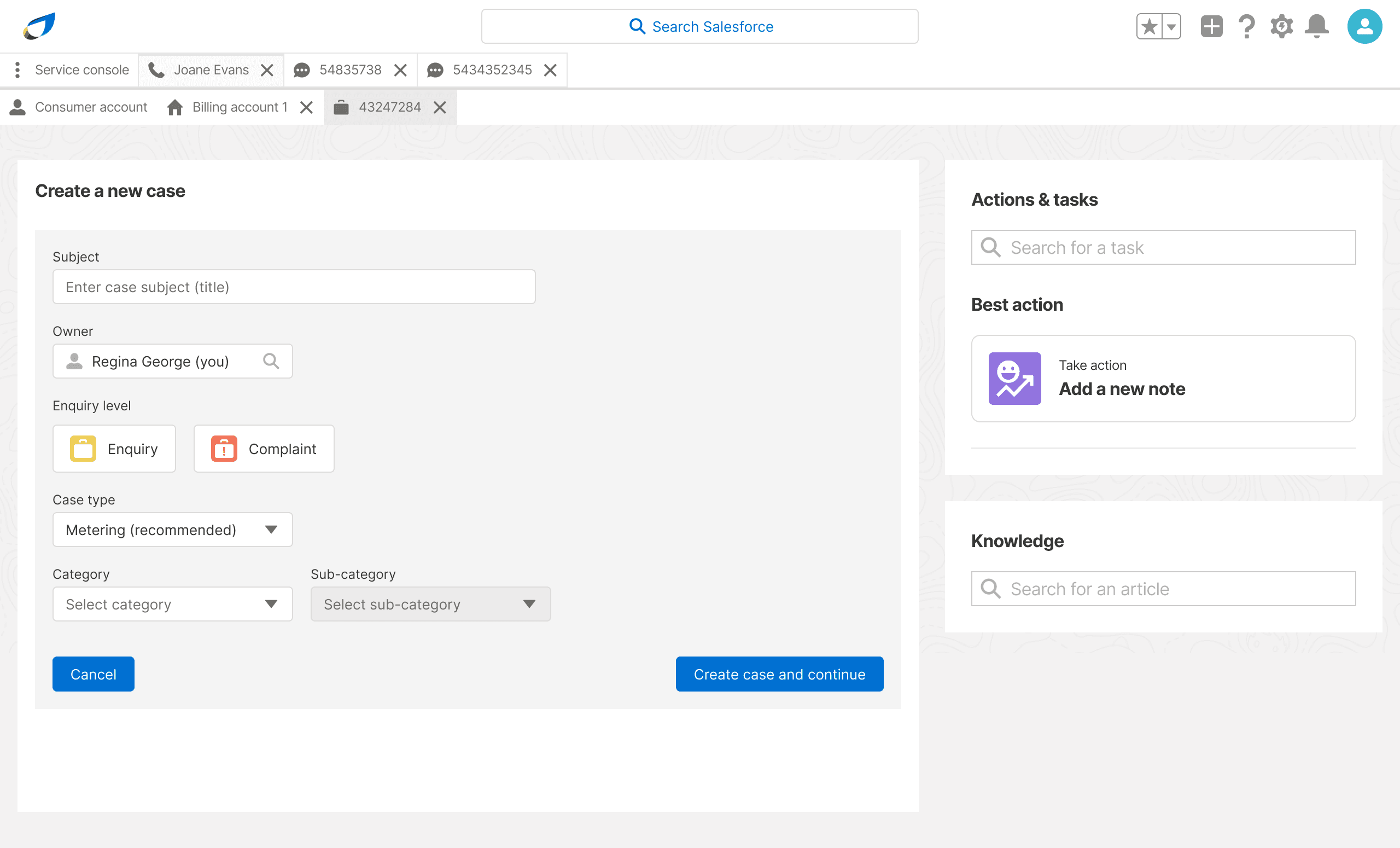
Redesign v.2

On testing our new case creation journey gained some significant accolades. However, it became evident that it did not go far enough to cut down the overheads required of the agent at the most customer-centric part of the interaction.

We decided to make a huge pivot; to a barebones journey that would only require the agent to enter the bare minimum details to move forward, and allow them to complete the remaining fields later on, potentially once contact with the customer had ended.

03

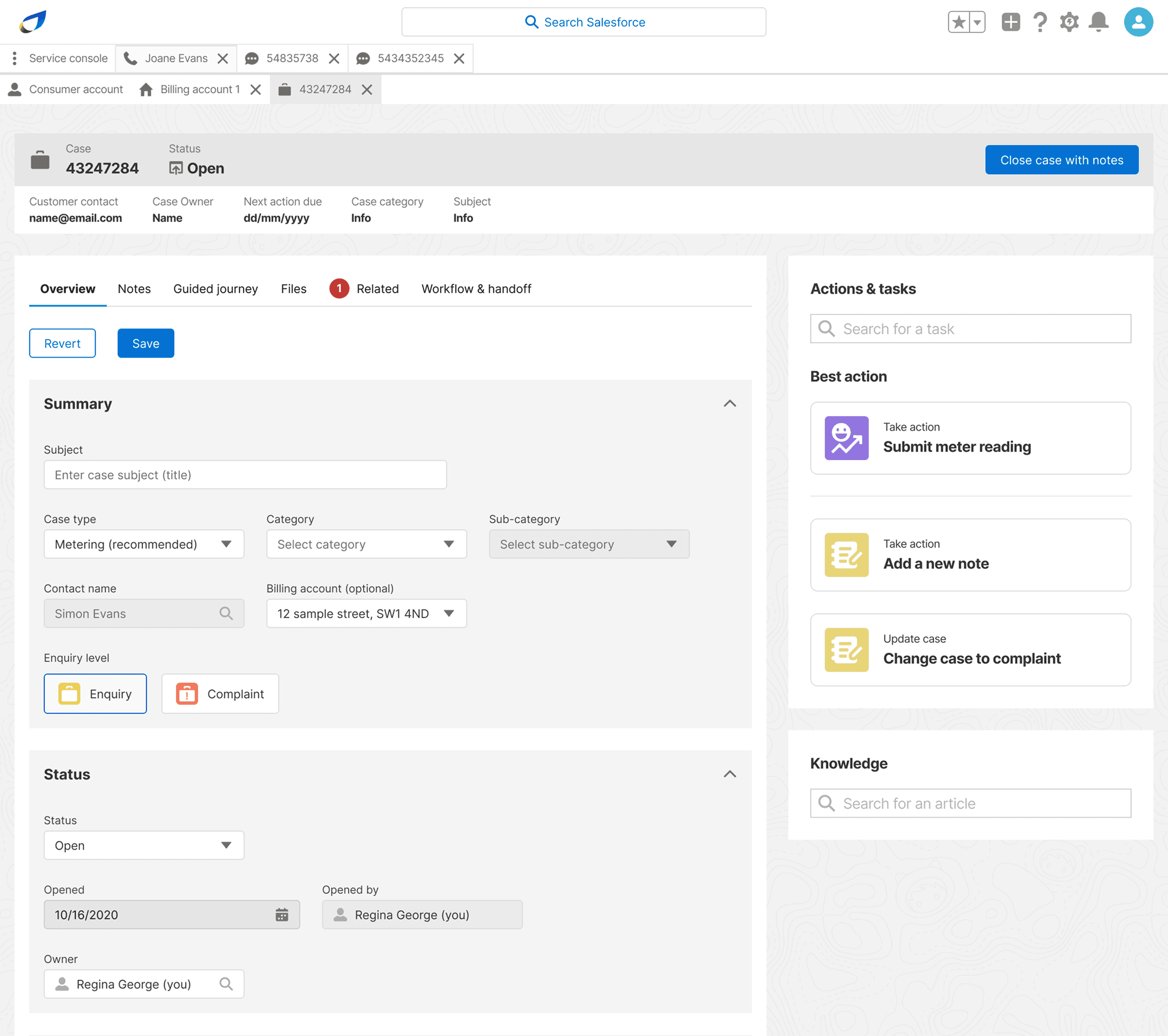
A new place for case details

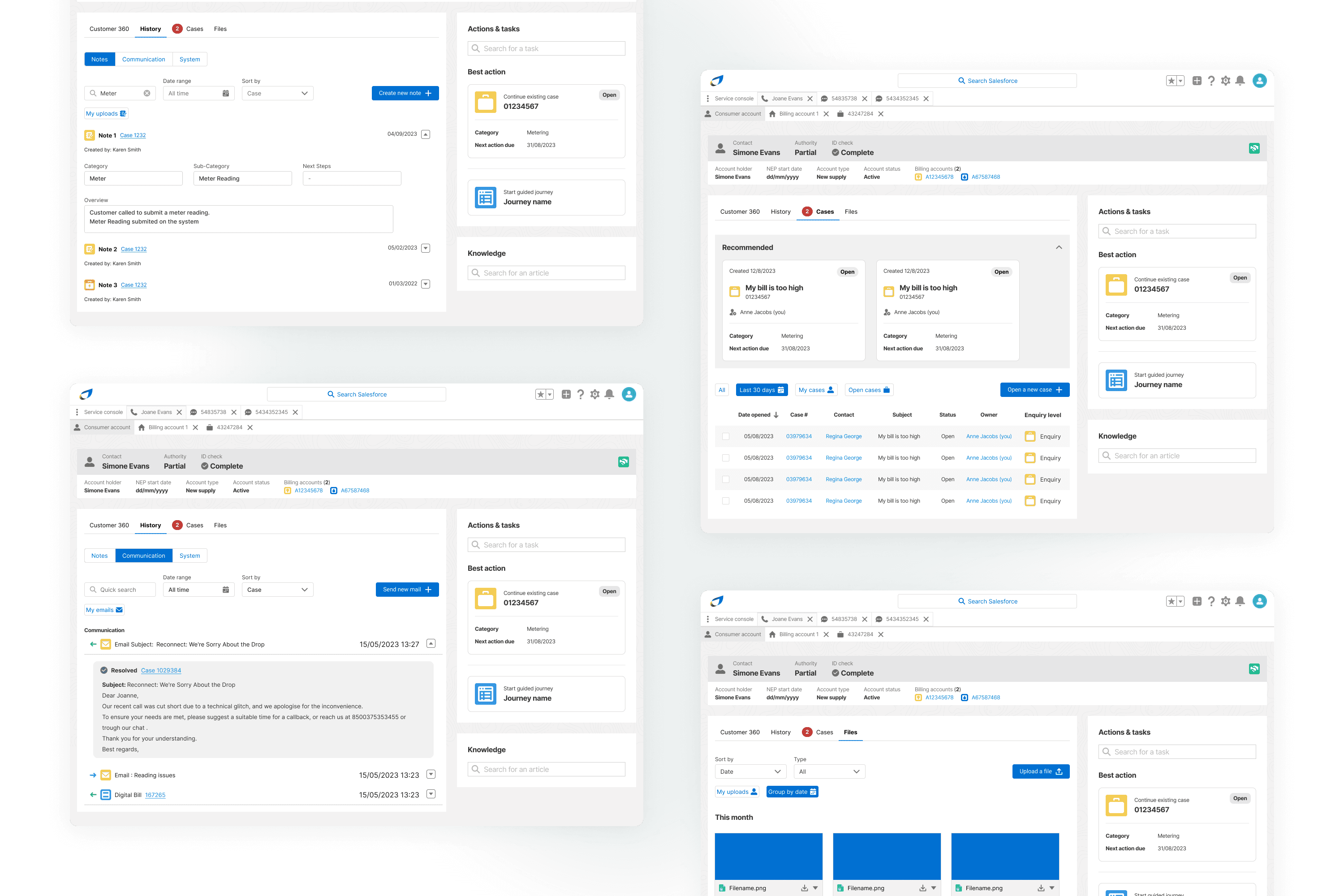
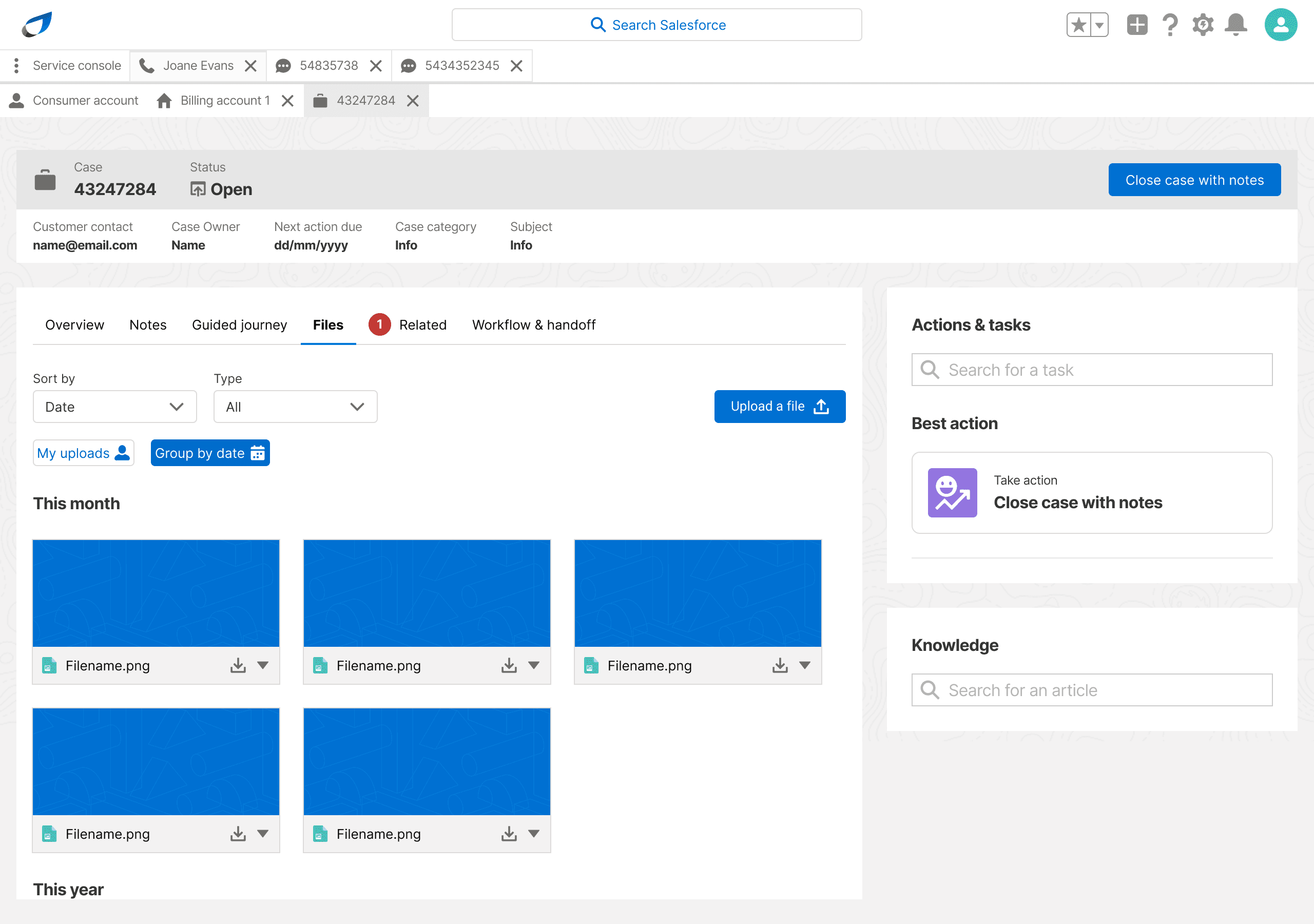
We moved most of things to do with a case away from a generic and repeating feature in the customer details page and into it's own kind of tab. Within this tab, we surfaced all the key functions agents needed to action any case.
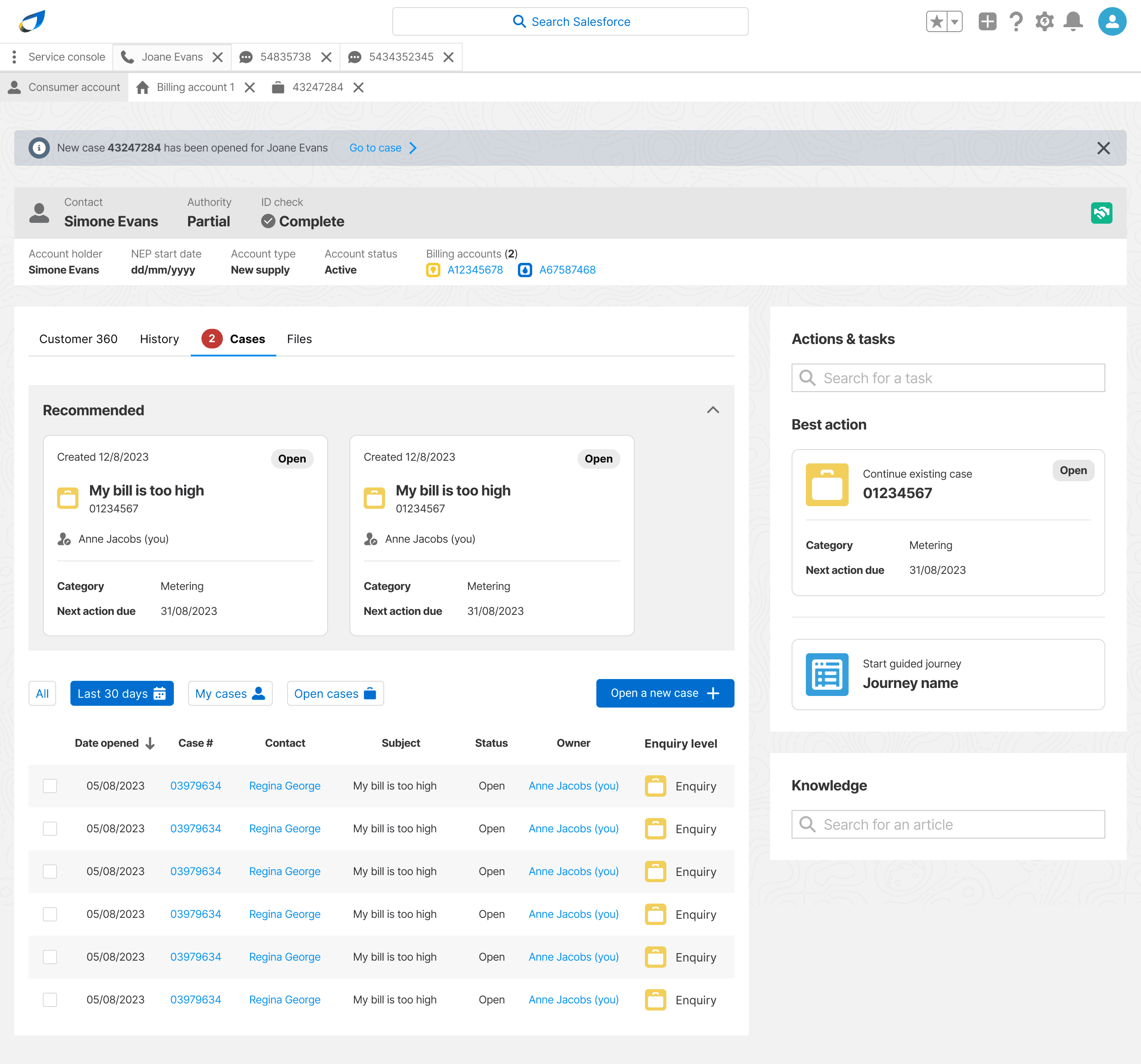
Tab 1 of 4: All cases

The result

Faster case creation

Agents were able to create richly populated cases with necessary details (i.e. not an empty shell) much faster.

Better communication

Redistribution of bureaucratic overheads away from communication-heavy part of the customer interaction.

Better communication

Redistribution of bureaucratic overheads away from communication-heavy part of the customer interaction.

Simpler process

More easily manageable completion of crucial case fields due to simplification and de-duplication.

Simpler process

More easily manageable completion of crucial case fields due to simplification and de-duplication.

Simpler process

More easily manageable completion of crucial case fields due to simplification and de-duplication.

Chapter 5

billing and metering

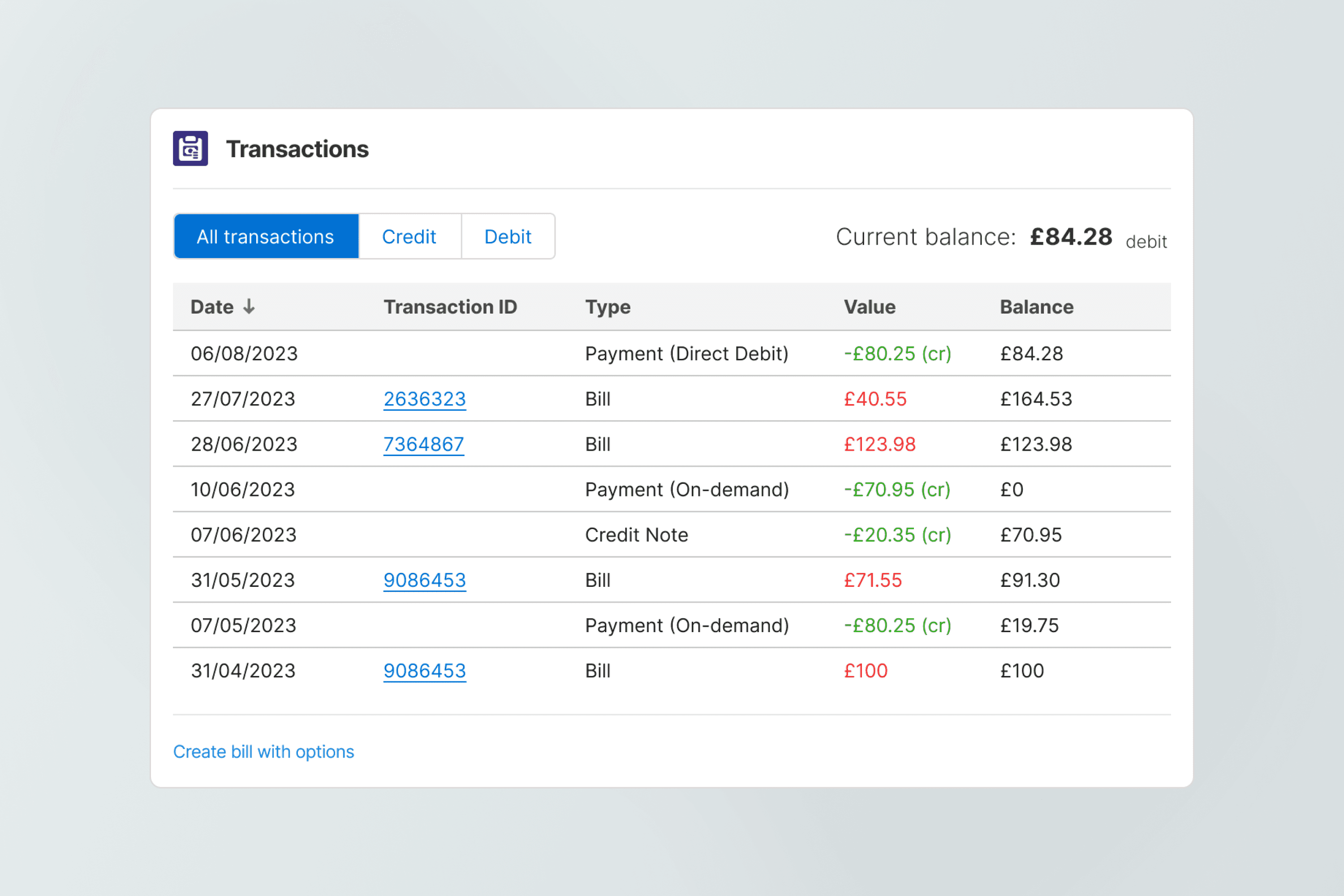
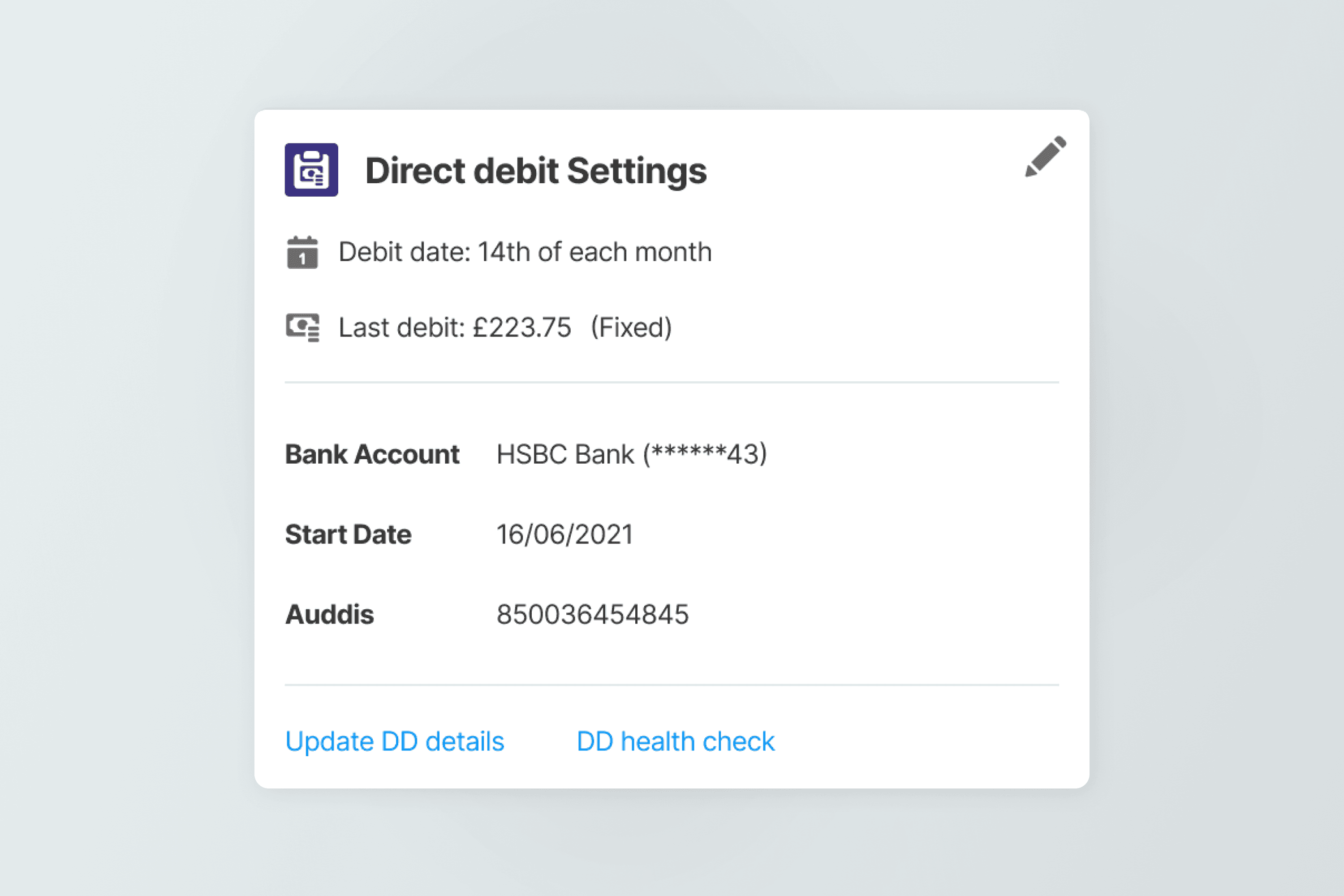
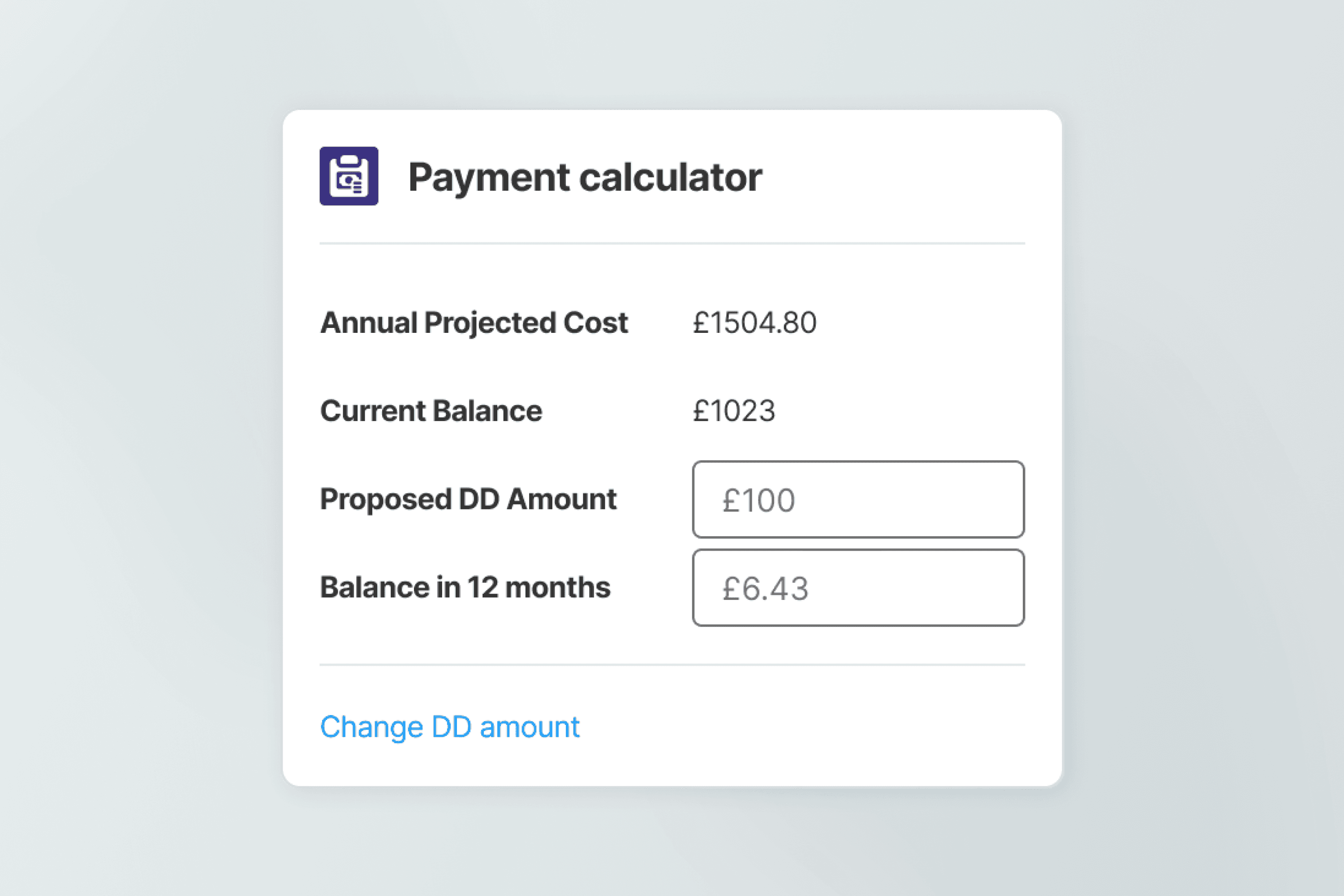
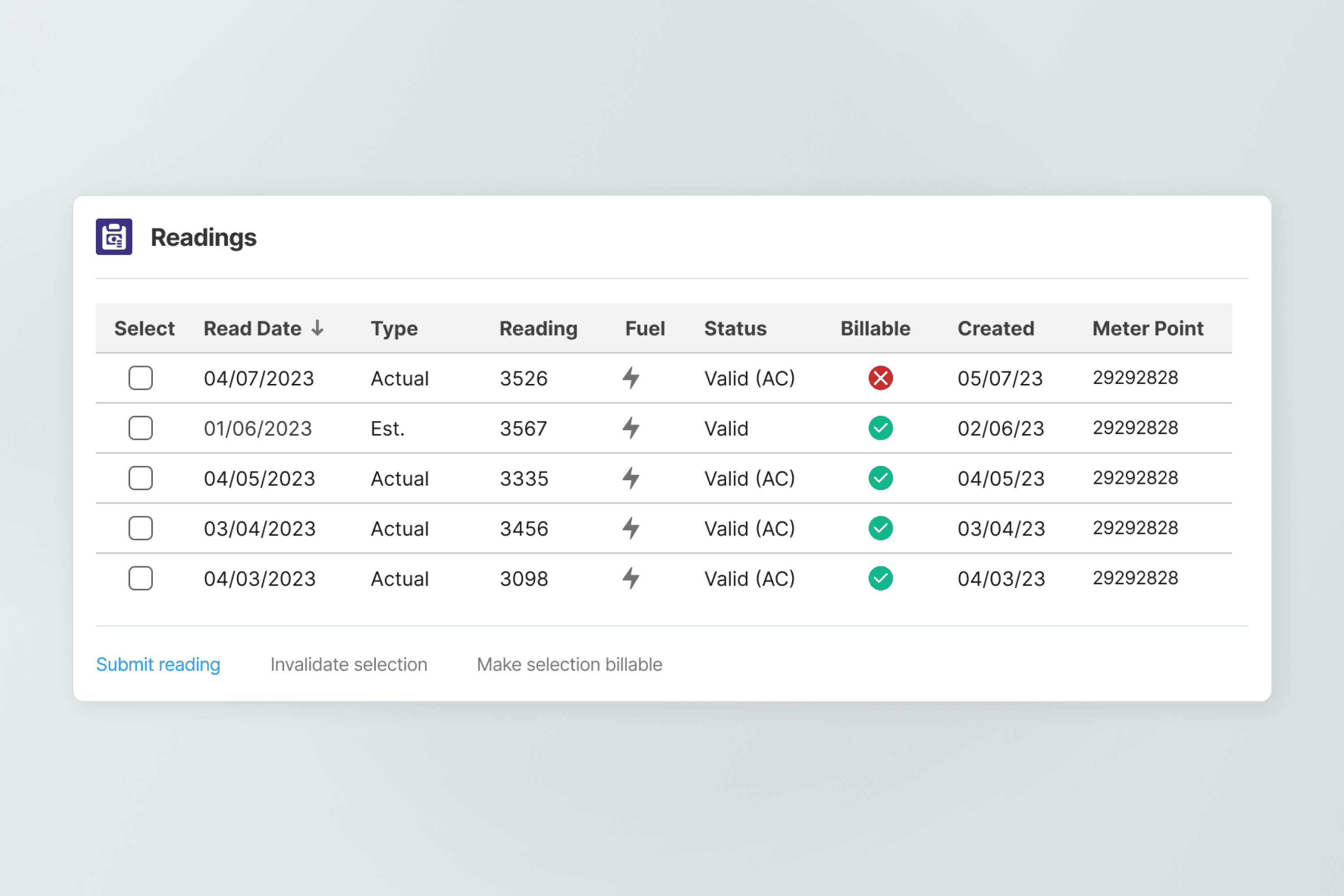
Deeply integrating all new functionality

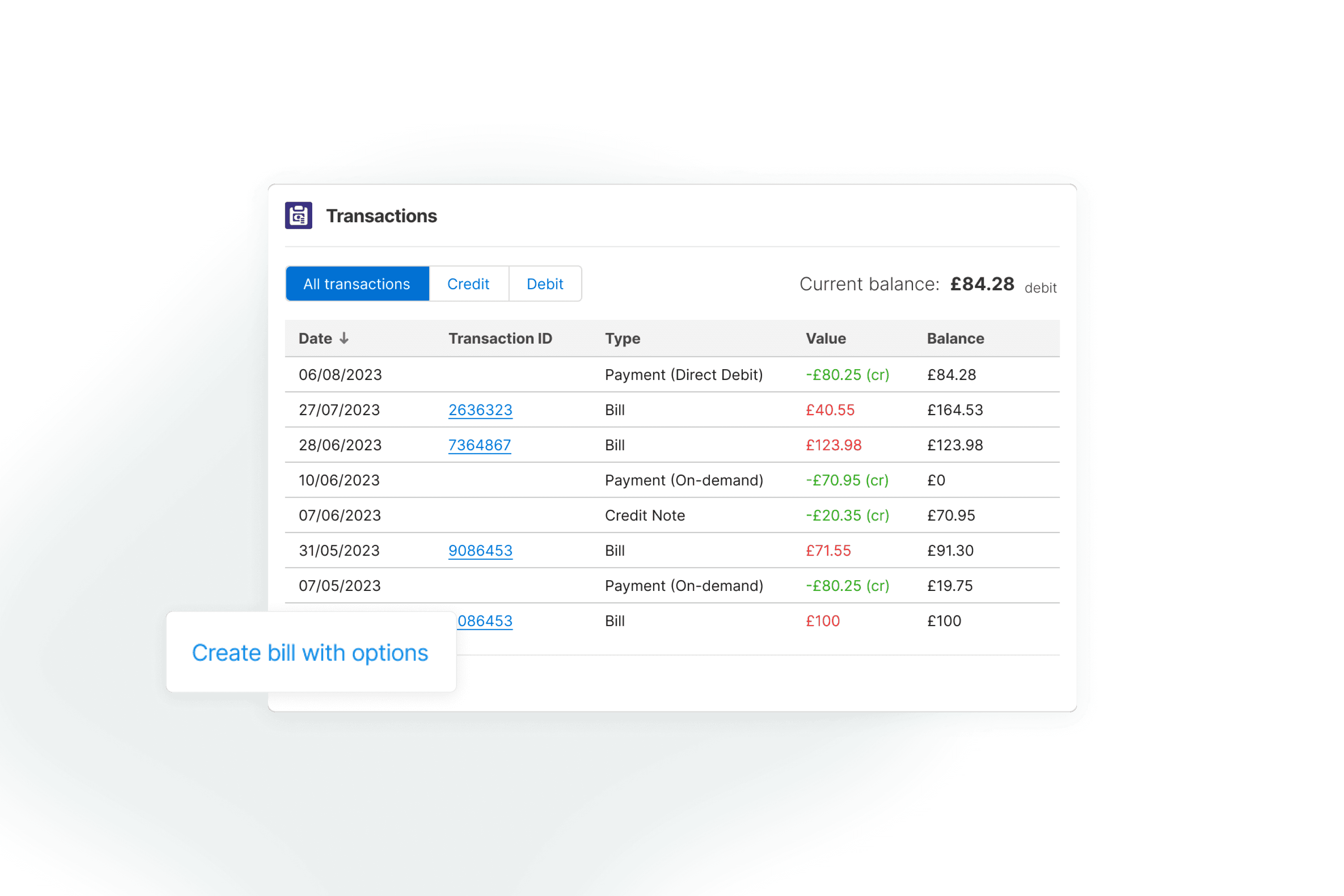
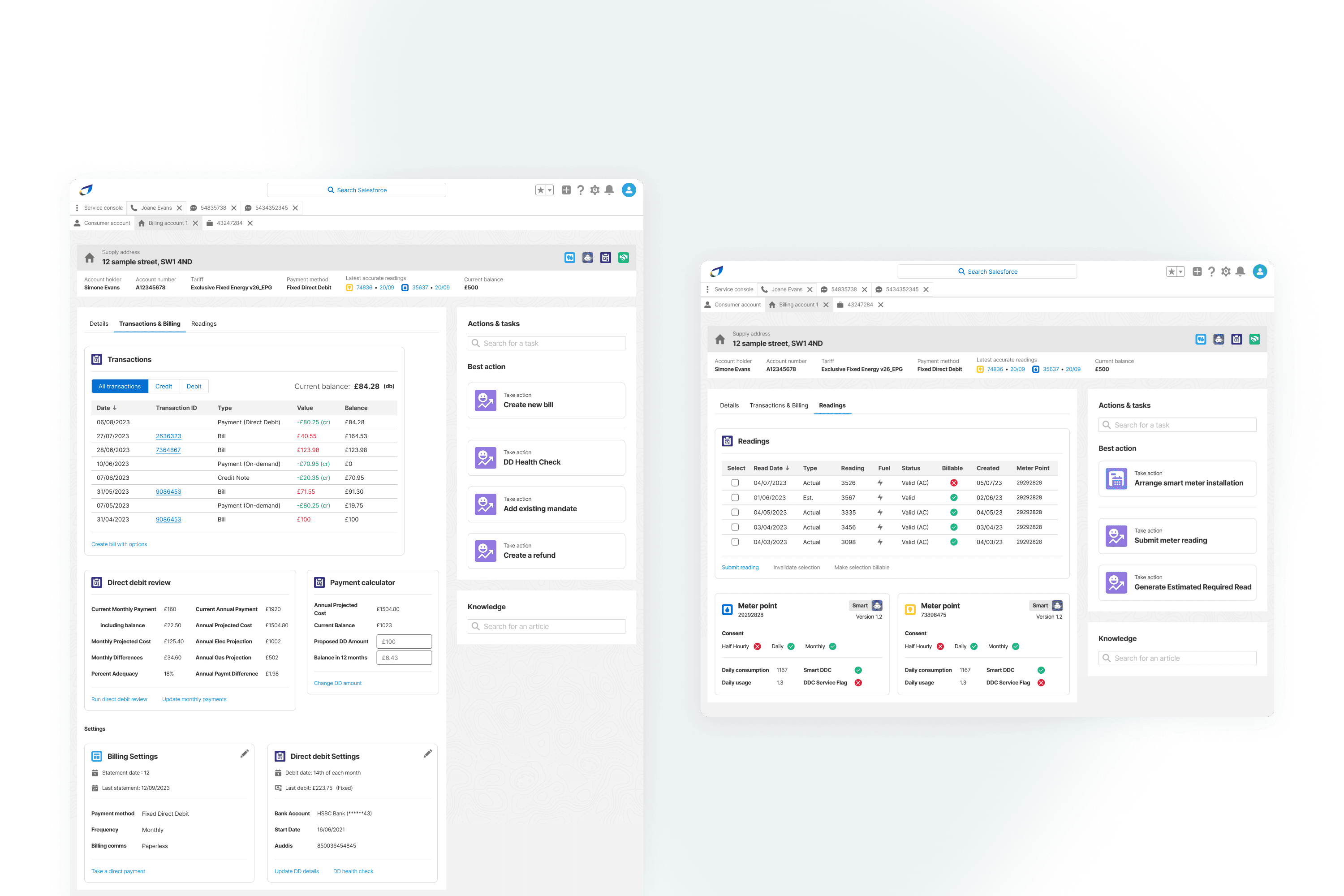
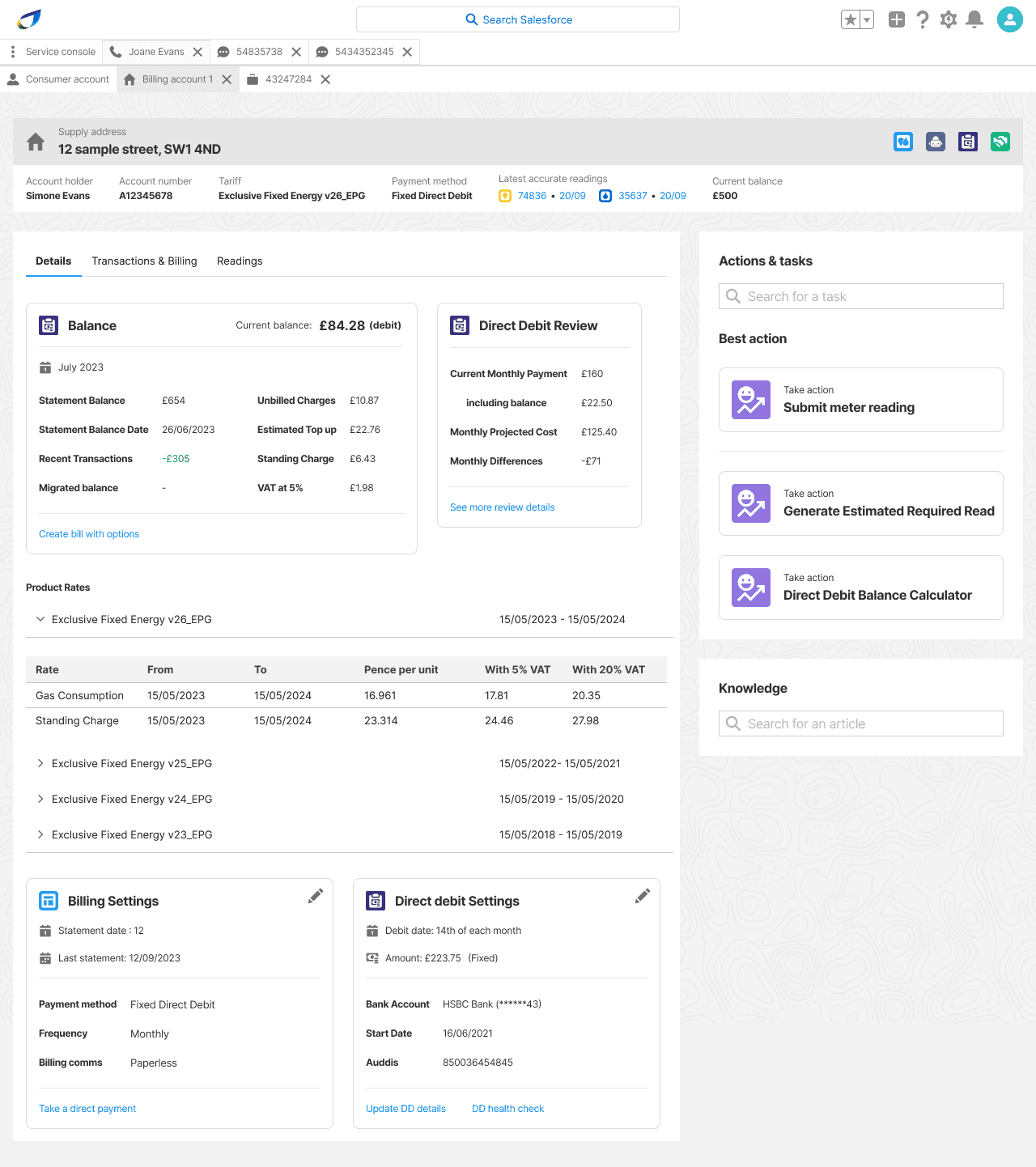
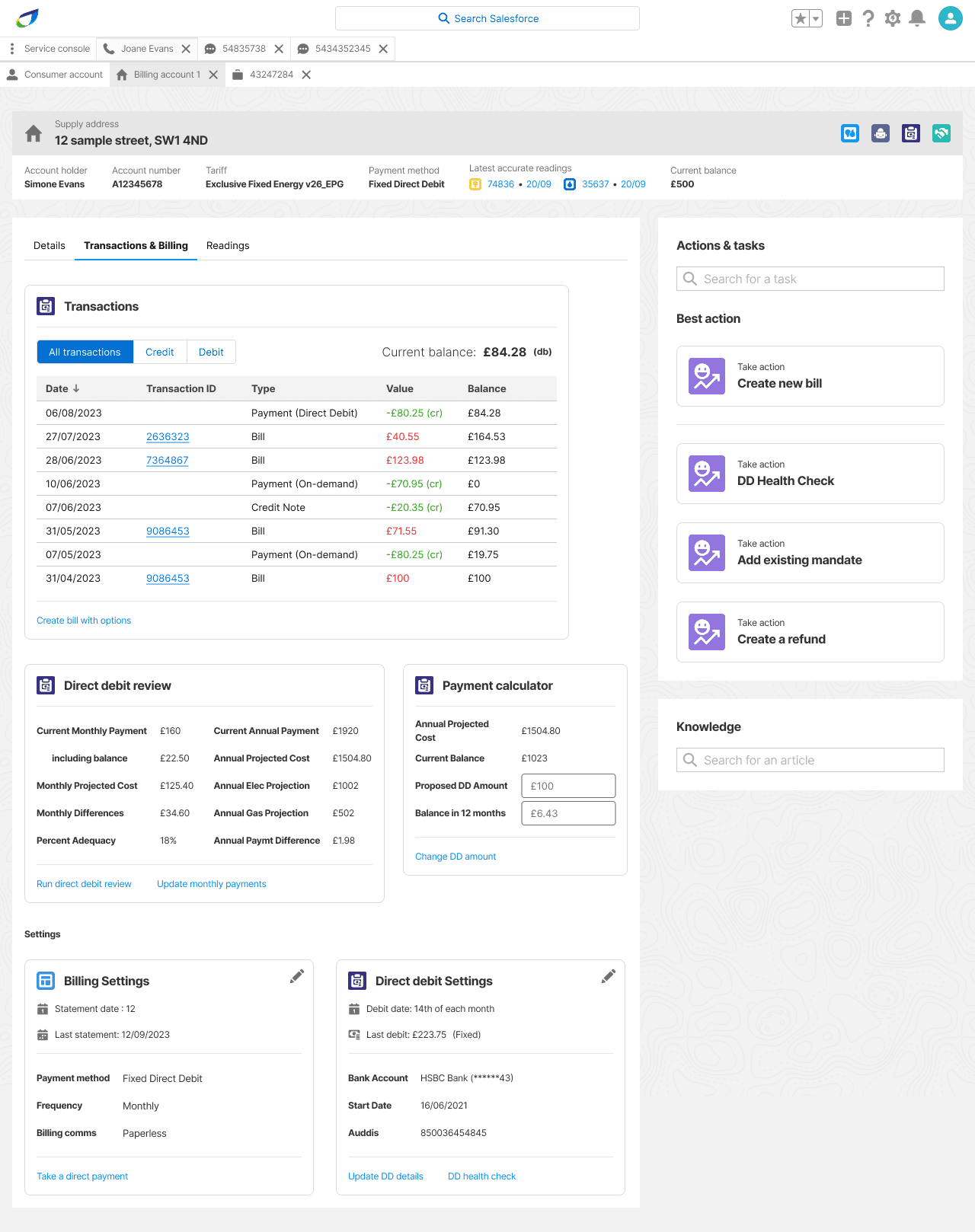
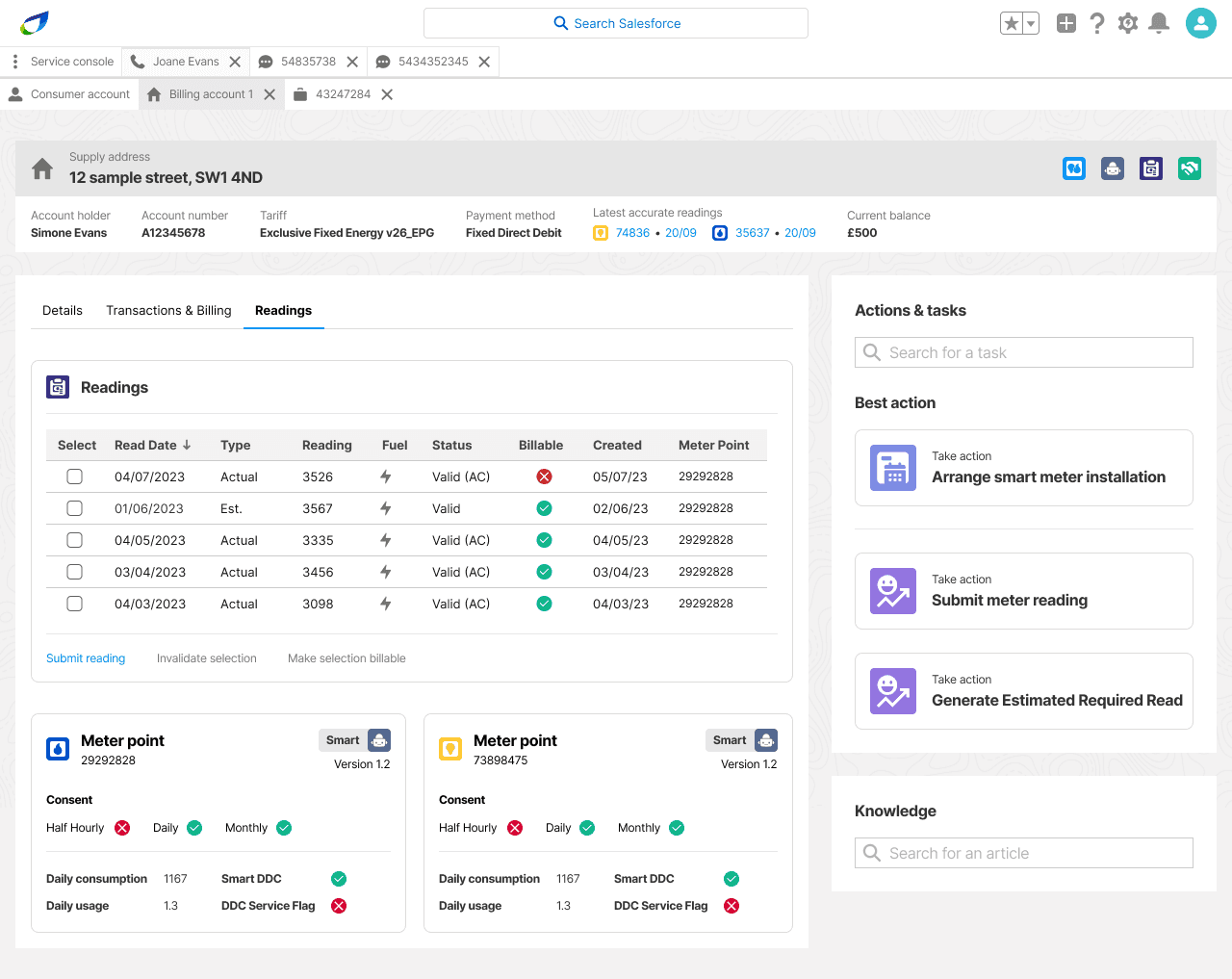
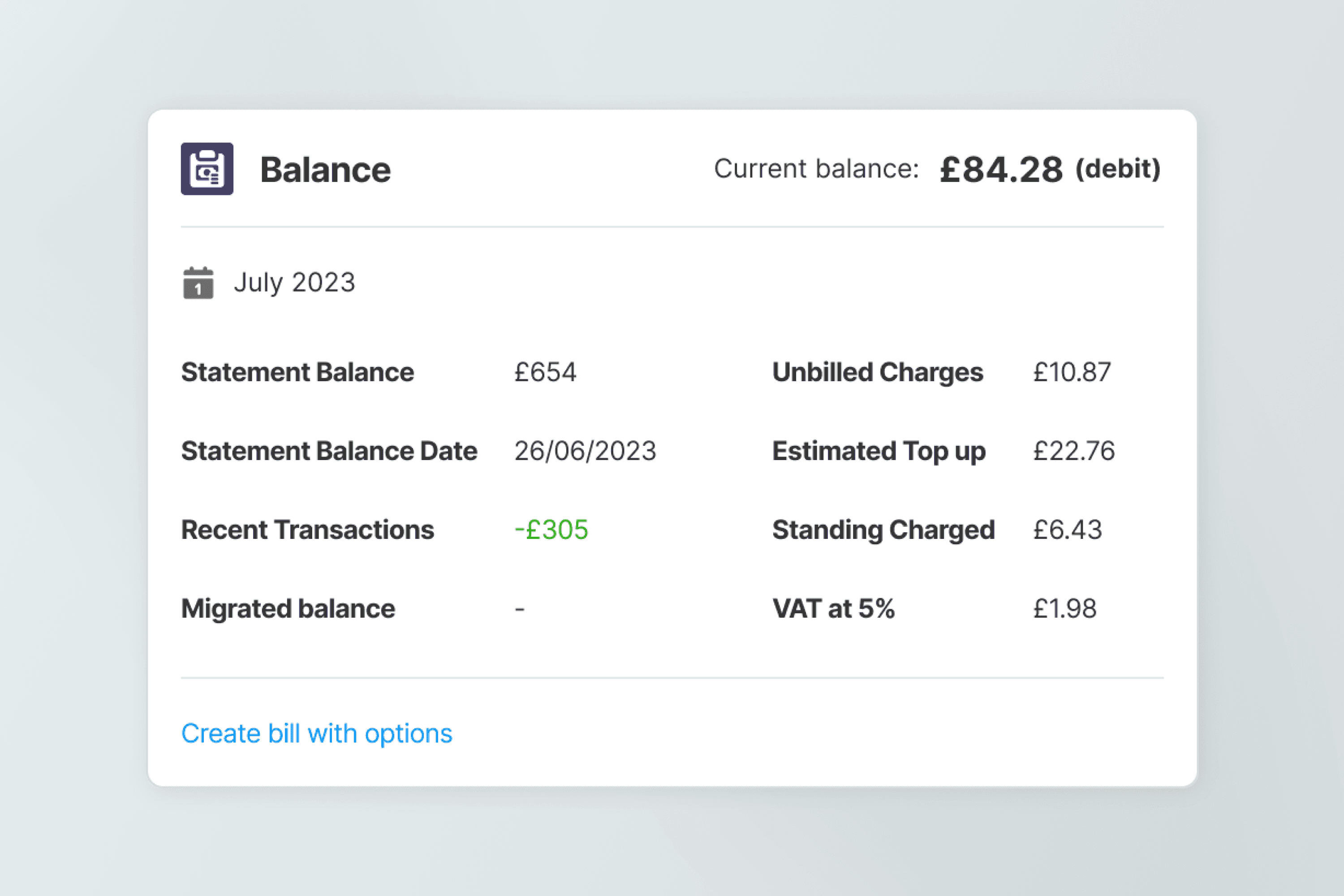
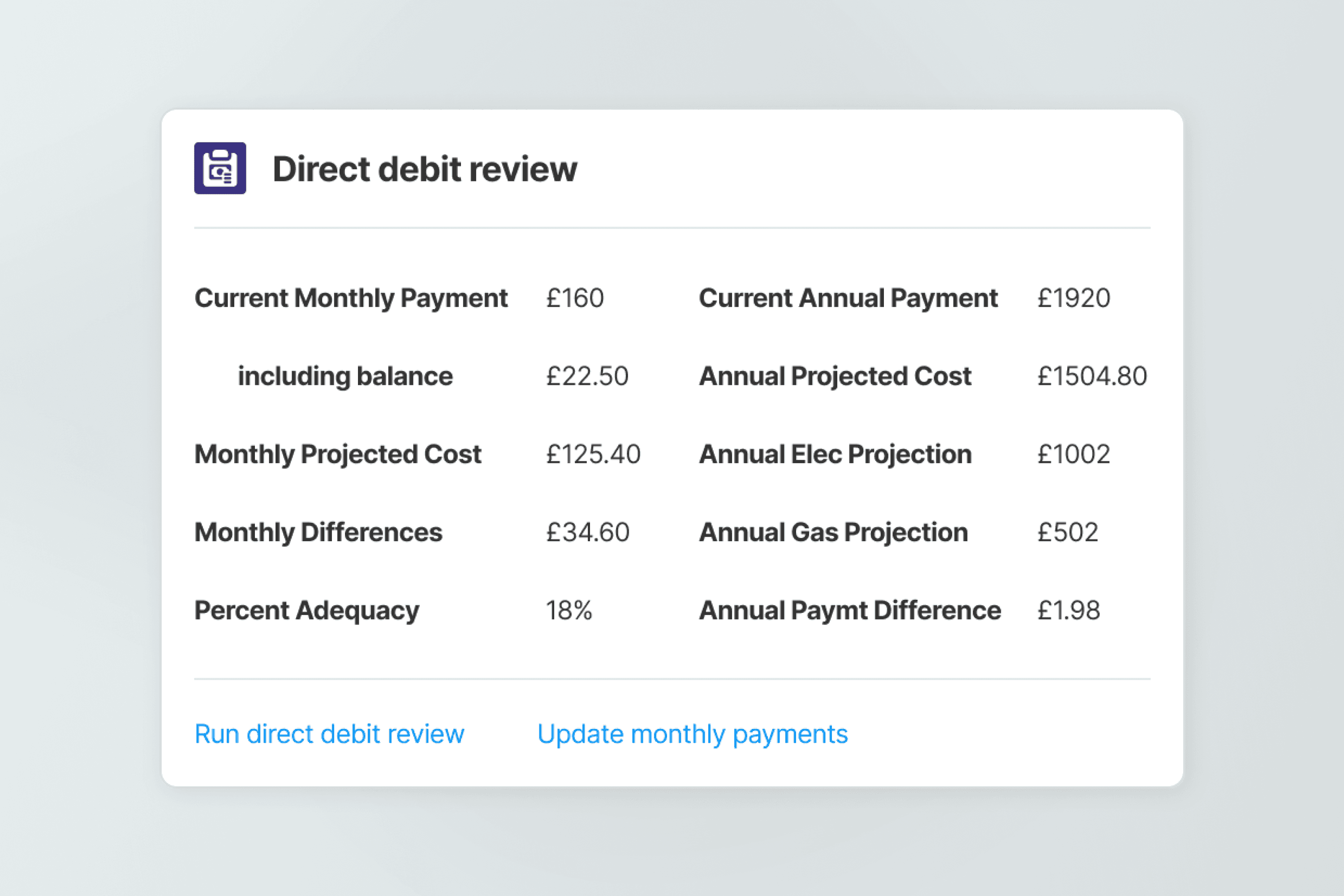
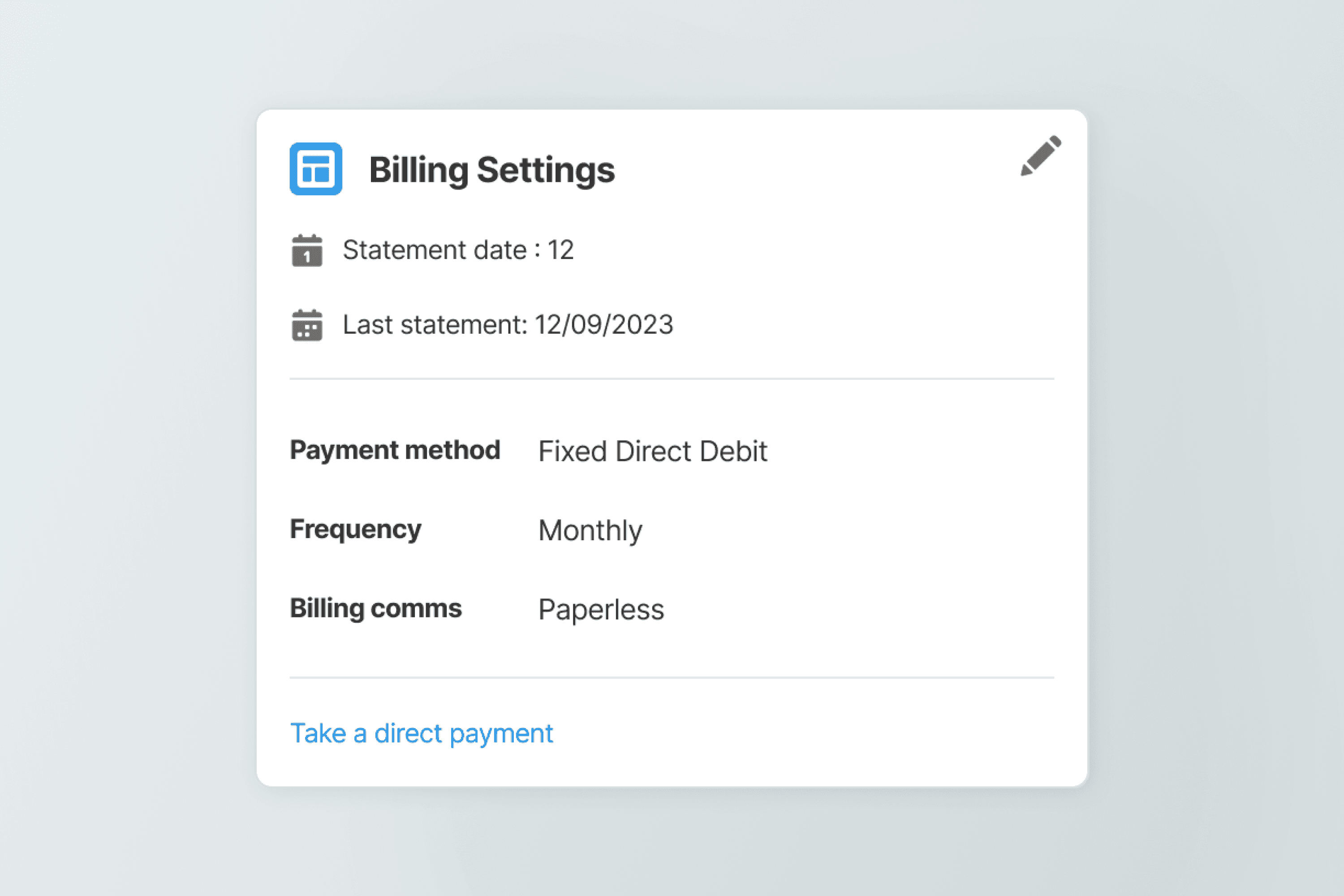
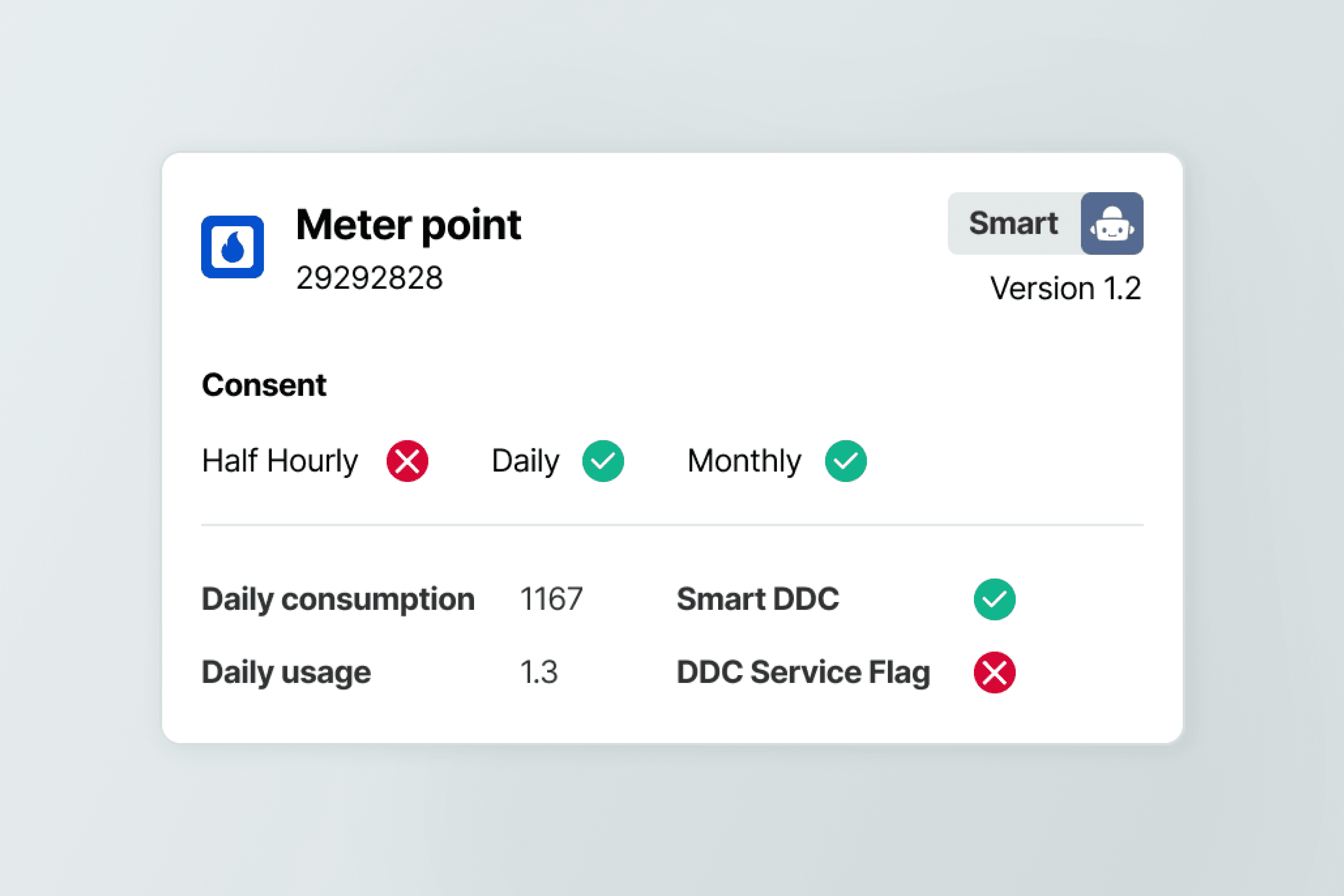
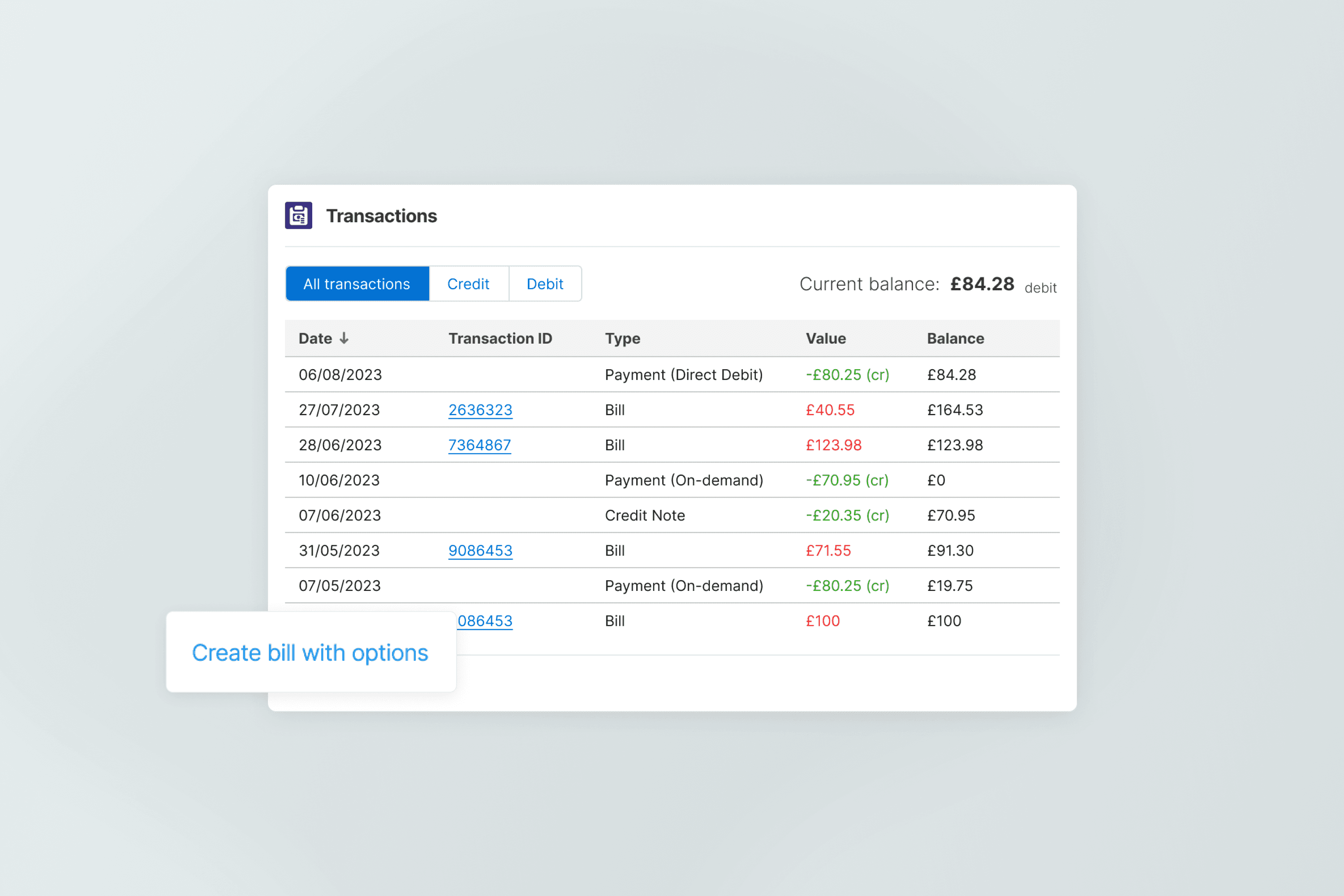
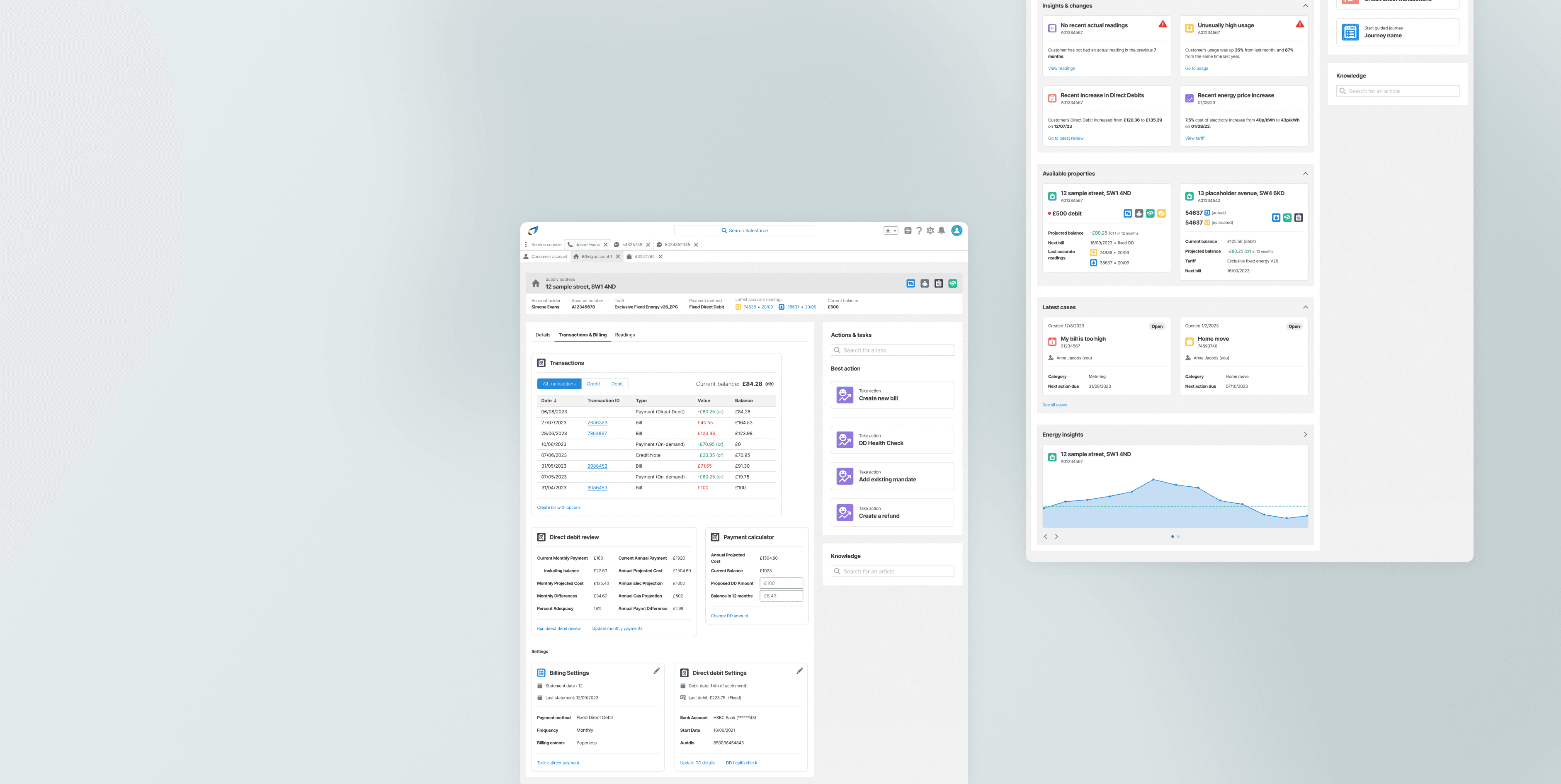
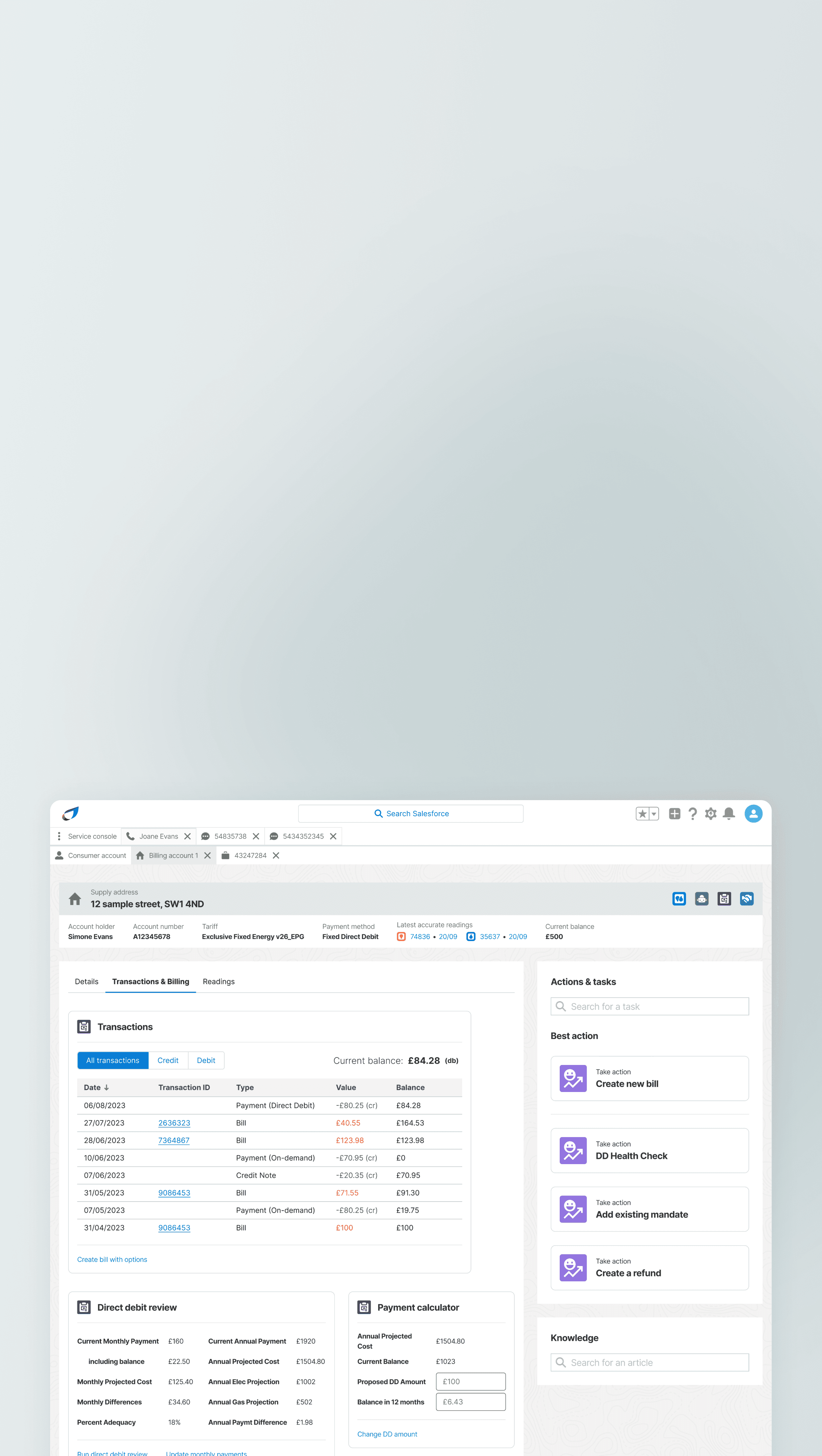
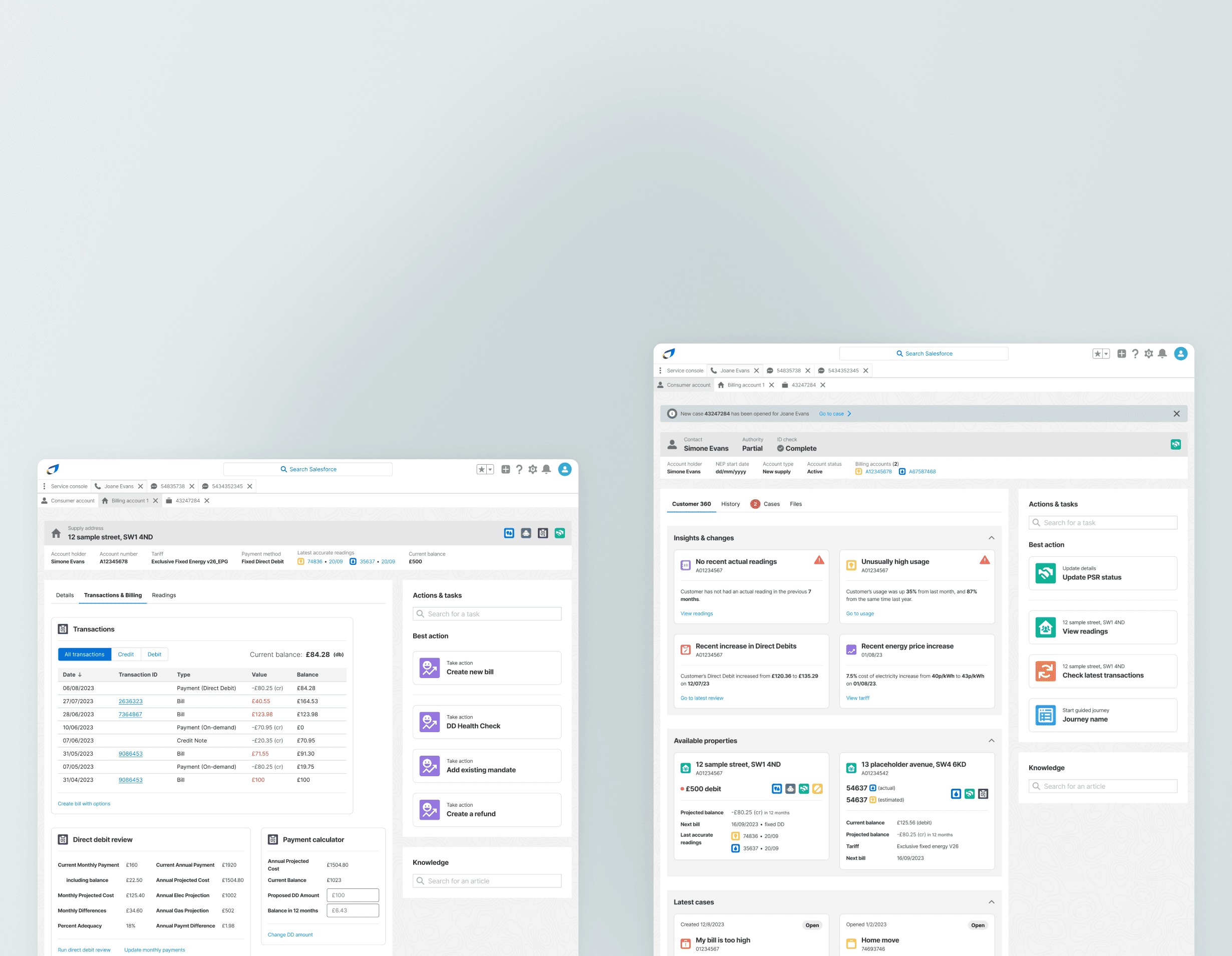
The task was to integrate British Gas's billing and metering tool - ENSEK Ignition, into Salesforce, using APIs to pull in key data and displaying each data point in the best possible way, in the right place, at the right time. Based on our research we developed these 3 screens.

Tab 1 of 3: Details

Key task: create a new bill.

View the customers balance at a glance.

Check what product the customer is currently subscribed to.

Quickly take a payment.

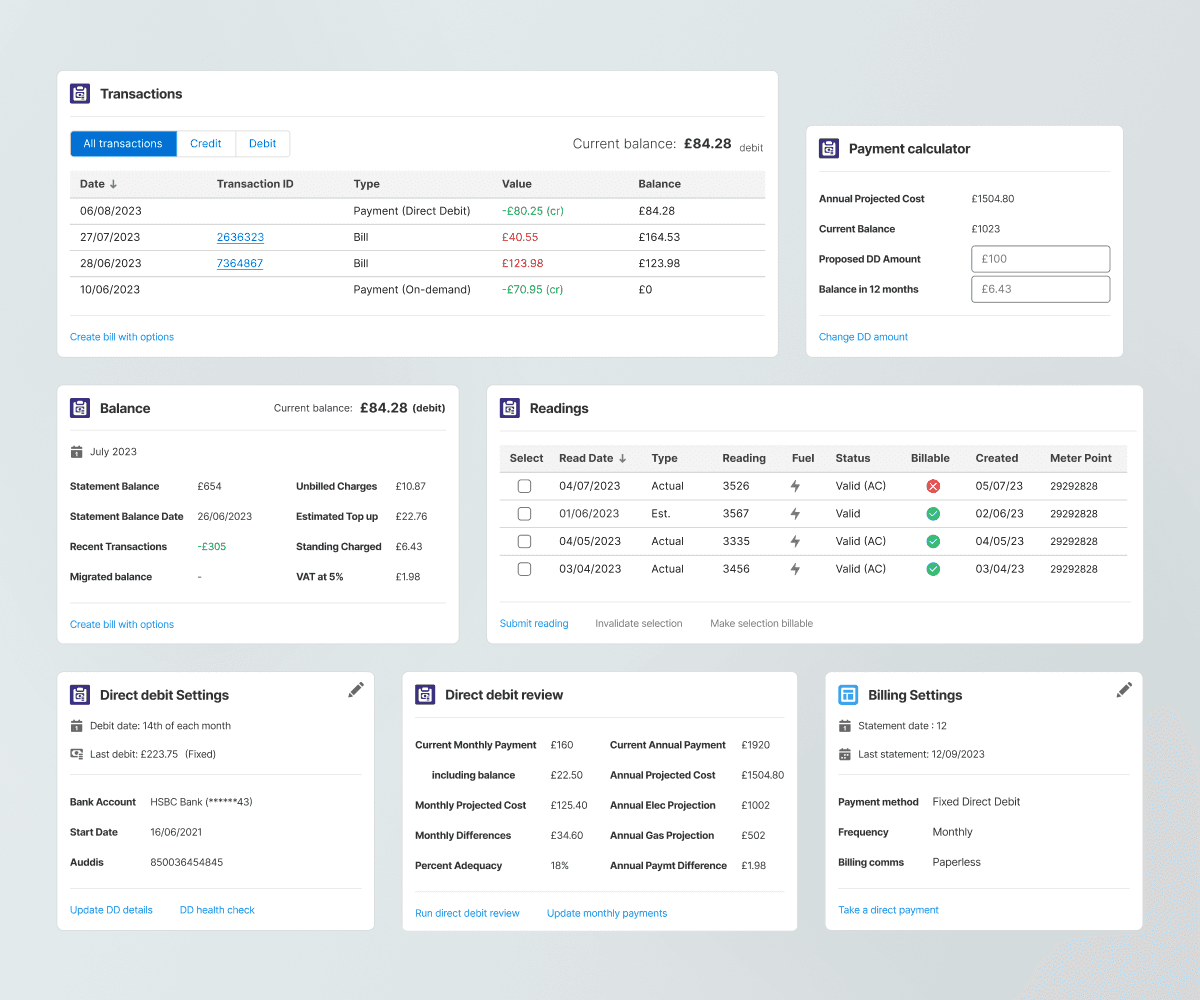
Leveraging quick cards

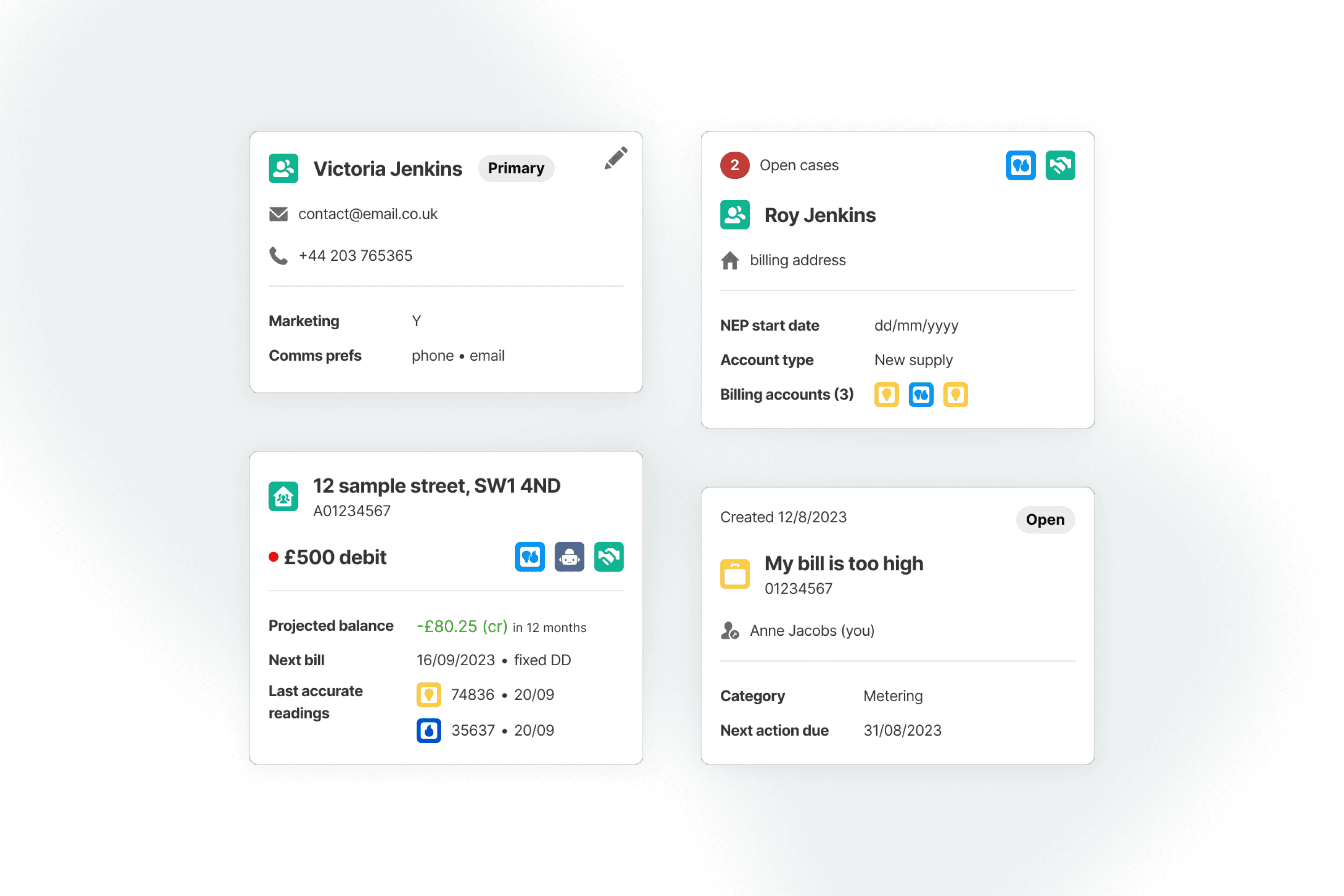
After dozens of hours of research to architect exactly what information agents needed, when and where - we decided on the use of a SF Lighting design system component known as 'quick cards.' These were highly flexible card-type components that enabled us to elegantly reorganise, categorise and display key data for agents.

Chapter 6

smart actions

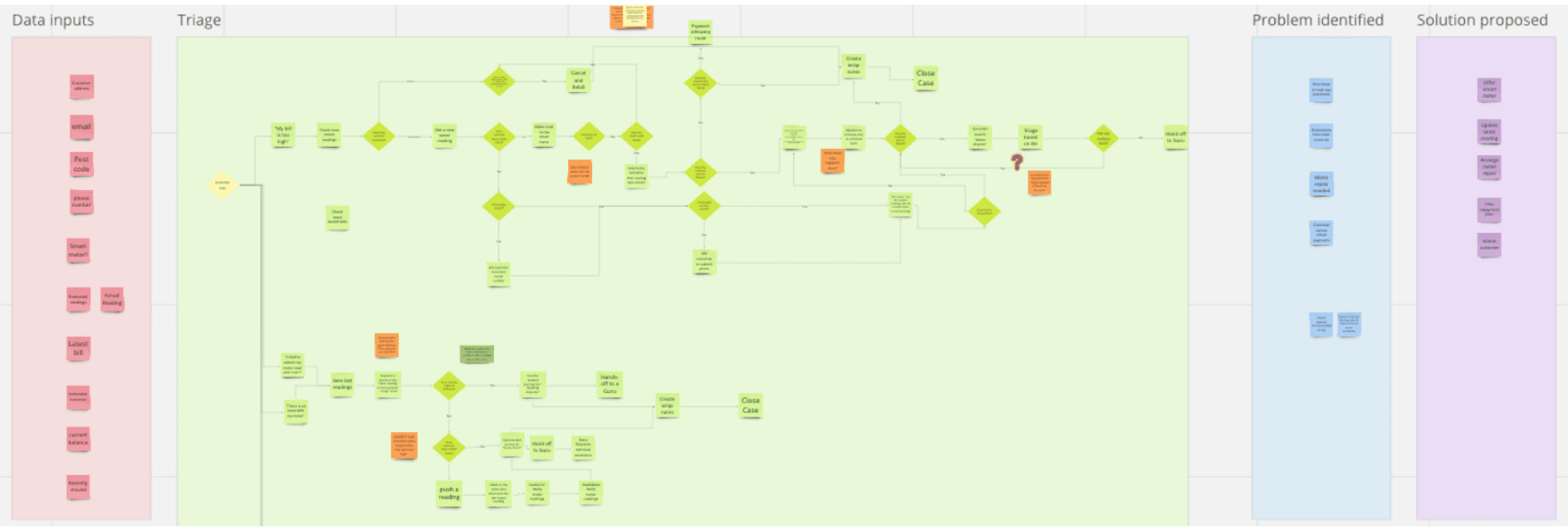
Unpacking the triage flow

We intricately mapped out a ‘Next Best Actions flow’ for the billing issues and meter readings journeys using the following three forms of research as sources of knowledge:

User (agent) interviews

What do agents do currently to reach each solution for customers? How do they decide the best course of action?

Exploration of the current taxonomy

What information exists currently in the system? How are tasks, case types and solutions mapped?

Exploration of the current taxonomy

What information exists currently in the system? How are tasks, case types and solutions mapped?

Interviews with industry SMEs

What is the optimal path to solving each customer’s problem? How should agents optimise their decisions?

Interviews with industry SMEs

What is the optimal path to solving each customer’s problem? How should agents optimise their decisions?

Interviews with industry SMEs

What is the optimal path to solving each customer’s problem? How should agents optimise their decisions?

A next best action for everything

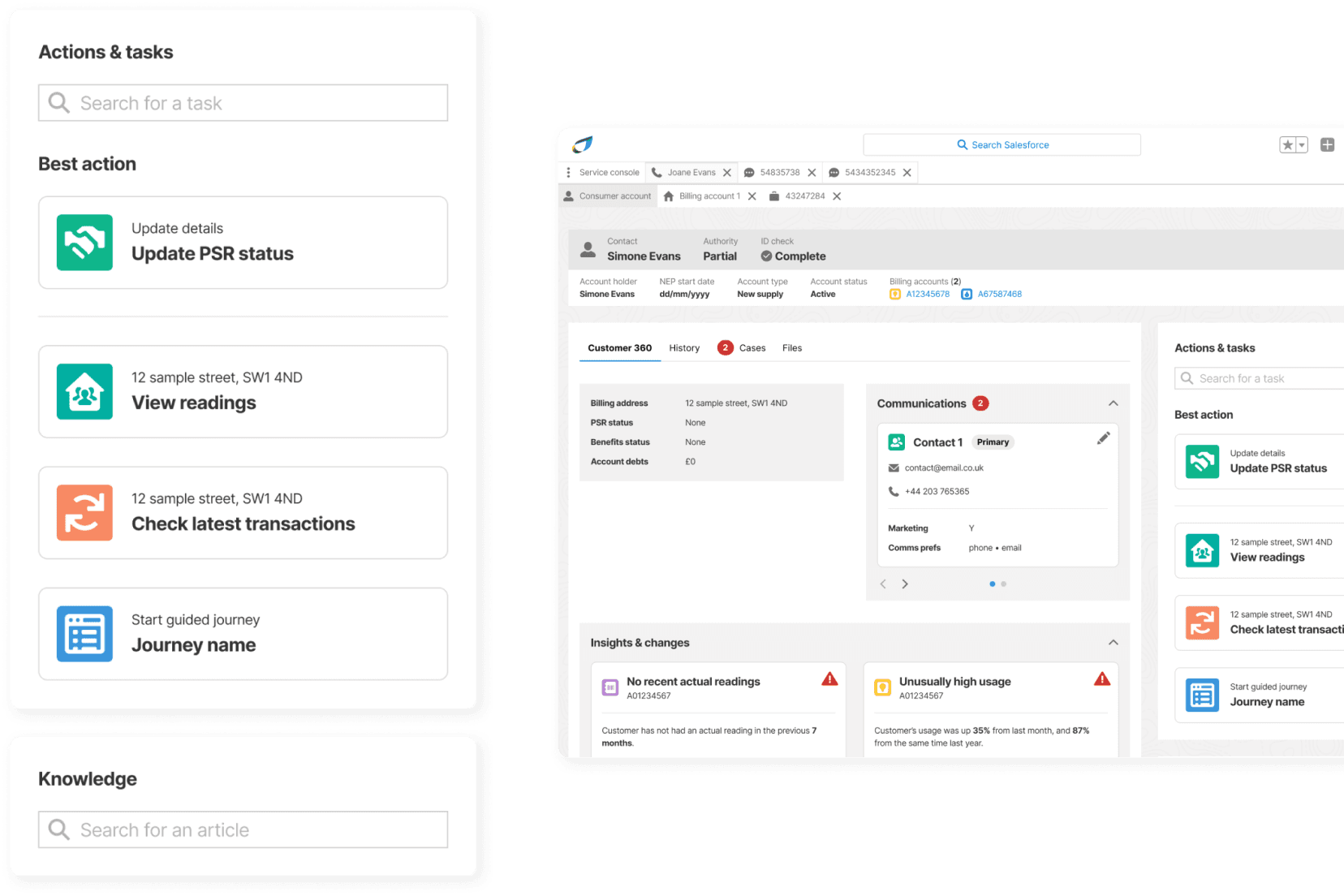
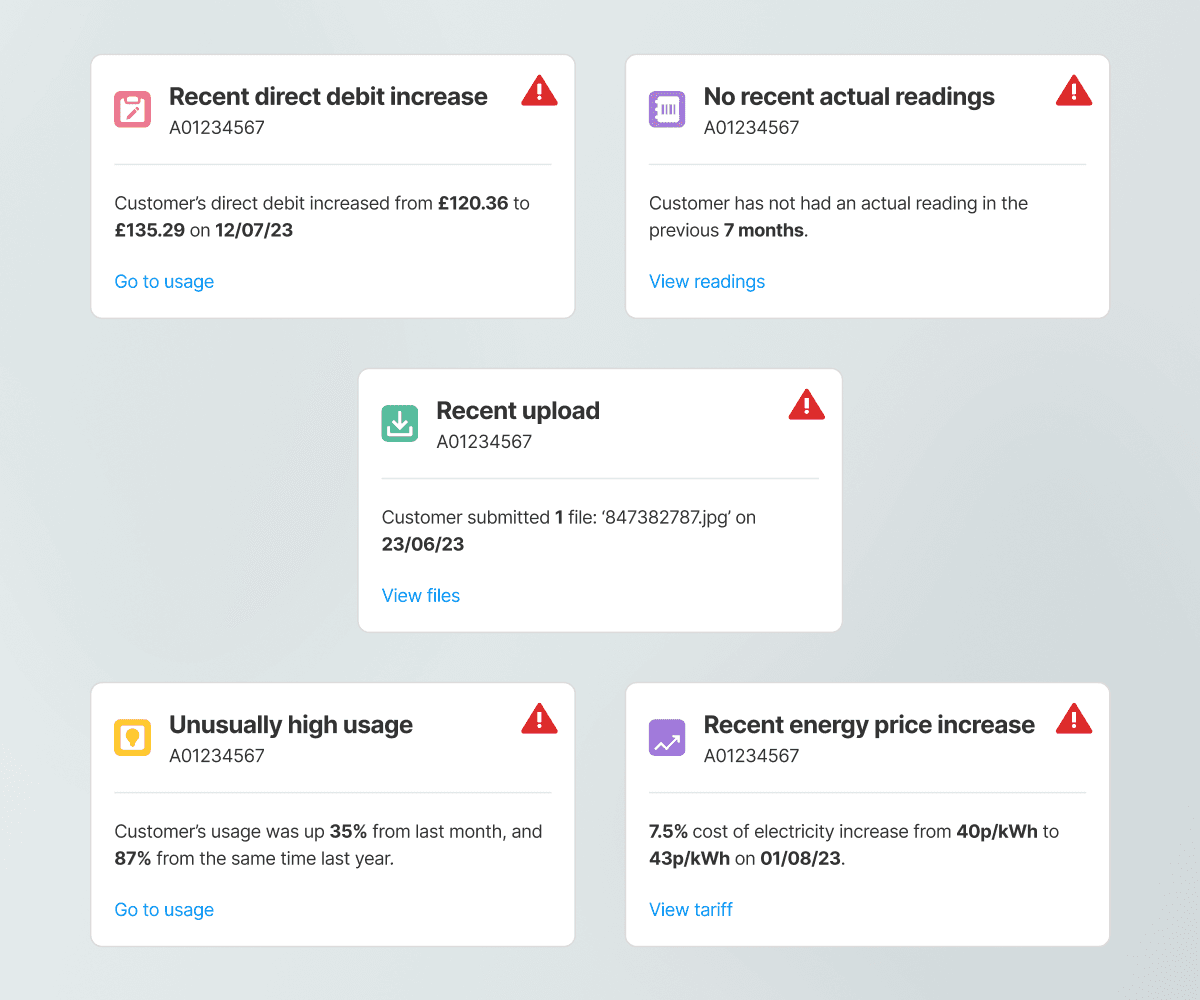
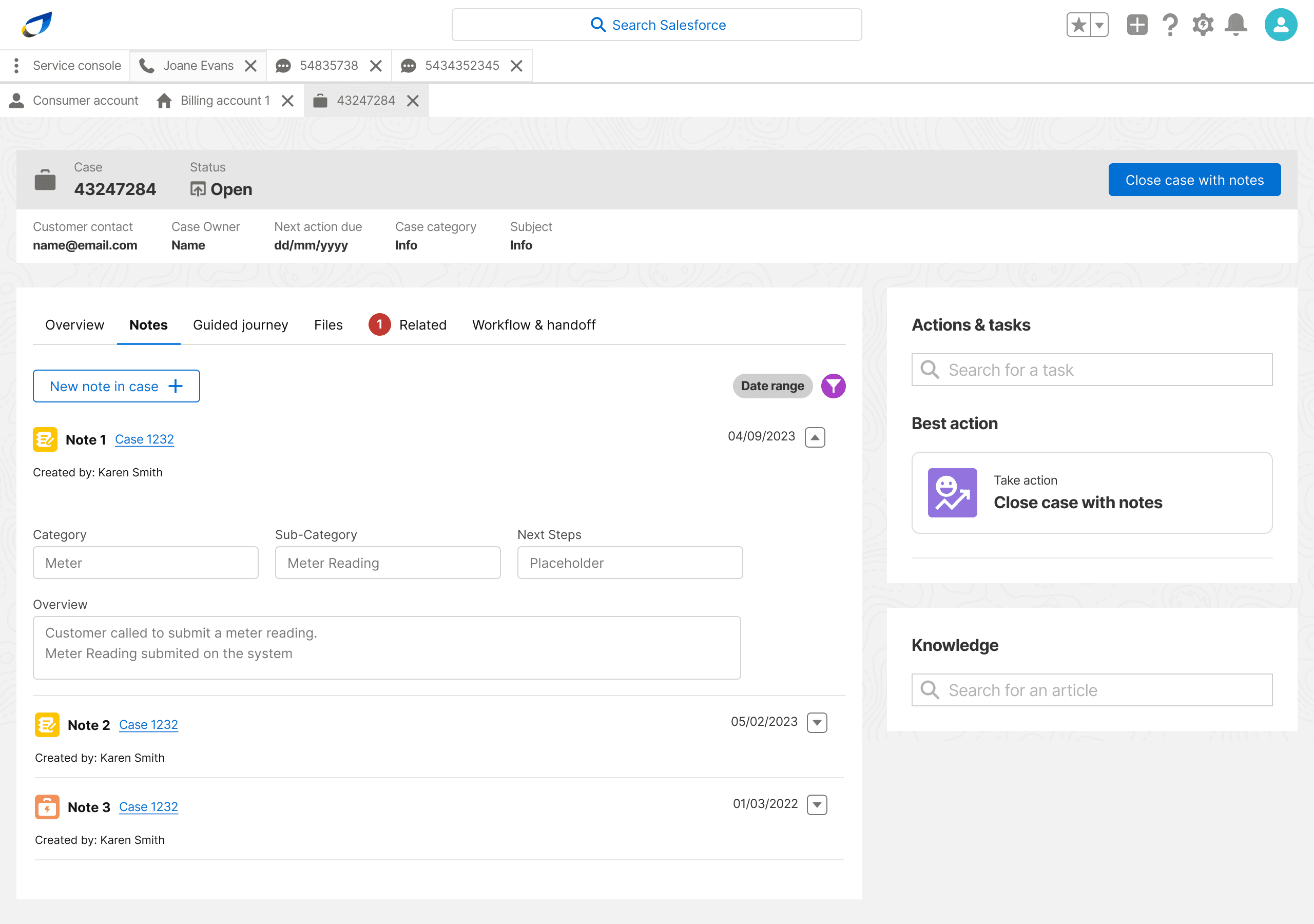
Surfacing actionable tasks when they were needed formed a crucial part of the billing and metering journeys. We wanted an effective way to distill all available situational data into the best possible follow-on, surfaced on two consistent reference points they could look at to streamline their next action:

On quick cards

We moved most of things to do with a case away from a generic and repeating feature in the customer details page and into it's own kind of tab. Within this tab, we surfaced all the key functions agents needed to action any case.
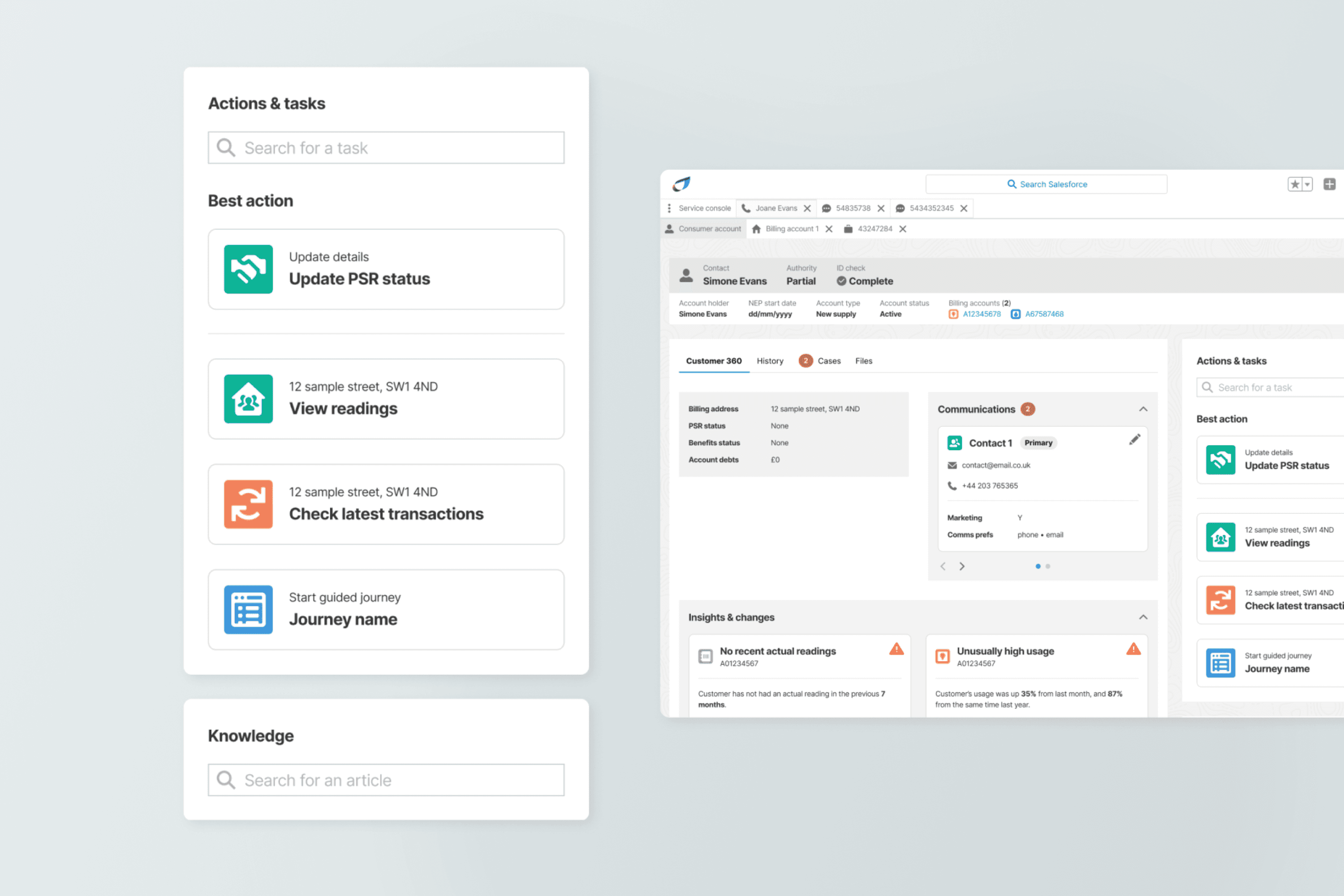
On the magic toolbar

The second, was as a more dynamic and journey-agnostic ‘next best action’ (NBA) on the Einstein-powered actions and tasks toolbar.

Chapter 7

case notes

Workflow pains

A major pain point we encountered in our research that was not foreseen in our brief surrounded the case workflow. Cases would occasionally be opened by one agent but picked up by another, who would have little context besides the notes they were given.

Minimal incentive

Ultimately there was no real reason for agents to want to take notes. The process was usually enforced by management where possible.

Arduous overheads

Taking notes was a long and arduous process, requiring agents to perform significant overheads at the end of every customer engagement.

Arduous overheads

Taking notes was a long and arduous process, requiring agents to perform significant overheads at the end of every customer engagement.

Room for error

Notes are not snowflakes, they do not thrive and blossom in their uniqueness. There was too much room for differentiation in quality and structure.

Room for error

Notes are not snowflakes, they do not thrive and blossom in their uniqueness. There was too much room for differentiation in quality and structure.

Room for error

Notes are not snowflakes, they do not thrive and blossom in their uniqueness. There was too much room for differentiation in quality and structure.

Design changes

Based on this we updated the design of the opening and closing case journey to work in the following ways:

01

Autopopulate case details

New cases, when opened, would auto-populate as many case detail fields as possible based on incoming data, and prompt the agent to manually fill in any remaining fields.

02

Easy complete

The case close button was moved to the toolbar of any case tab, so that the agent could close it easily.

03

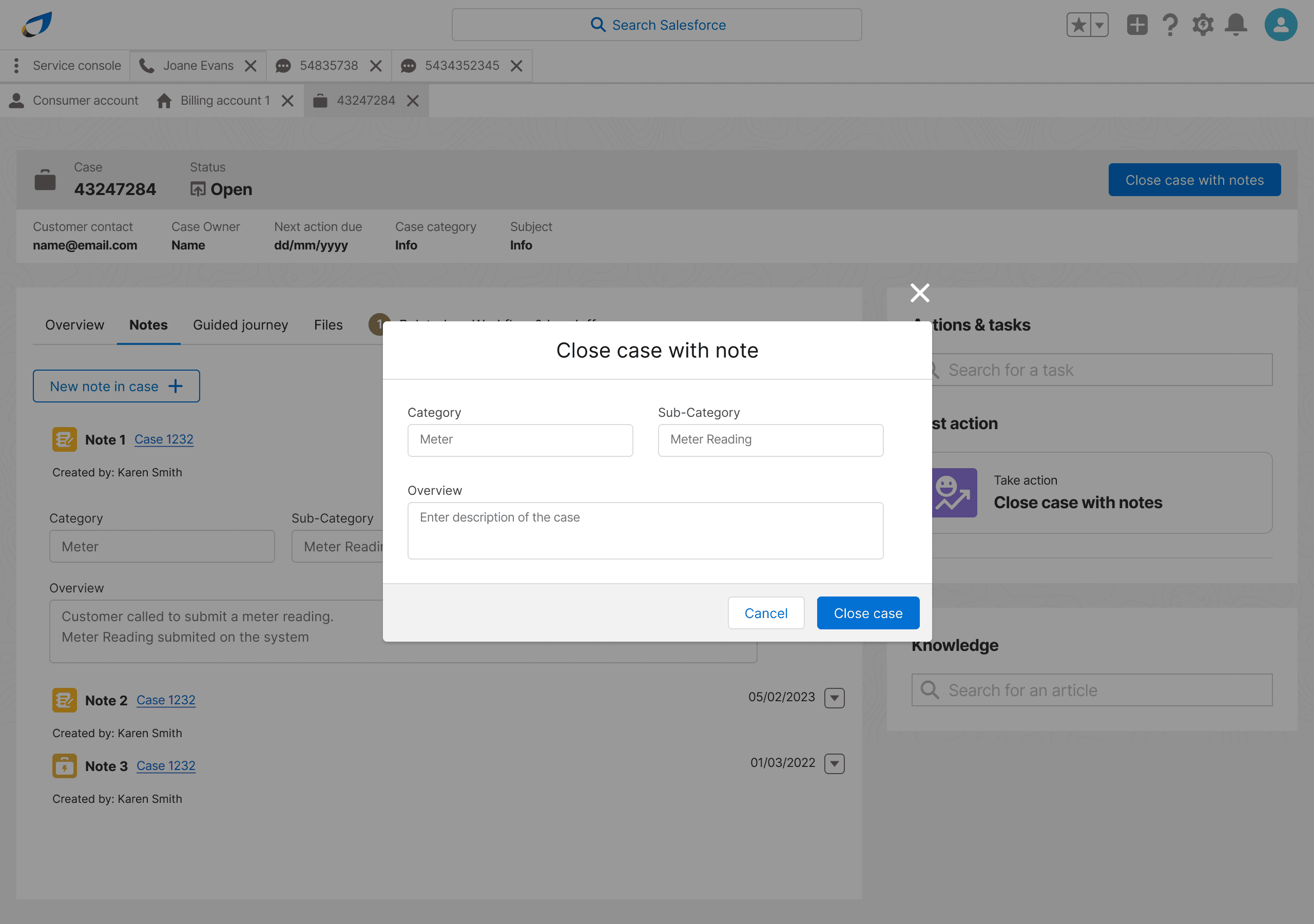
Quick closure notes

On closing a case OR exiting a case tab, Salesforce would trigger a smart modal to prompt the agent to create at least basic notes. This would be pre-populated if possible.
Chapter 8

Final testing

SME reviews

We embarked on a series of review sessions with the aim of finessing the information structure of our key components, cards and pages to ensure we were displaying the correct data points where agents needed them most. This involved over 30 hours of review sessions, presenting visual reference points either in a 1-on-1 or focus group settings.
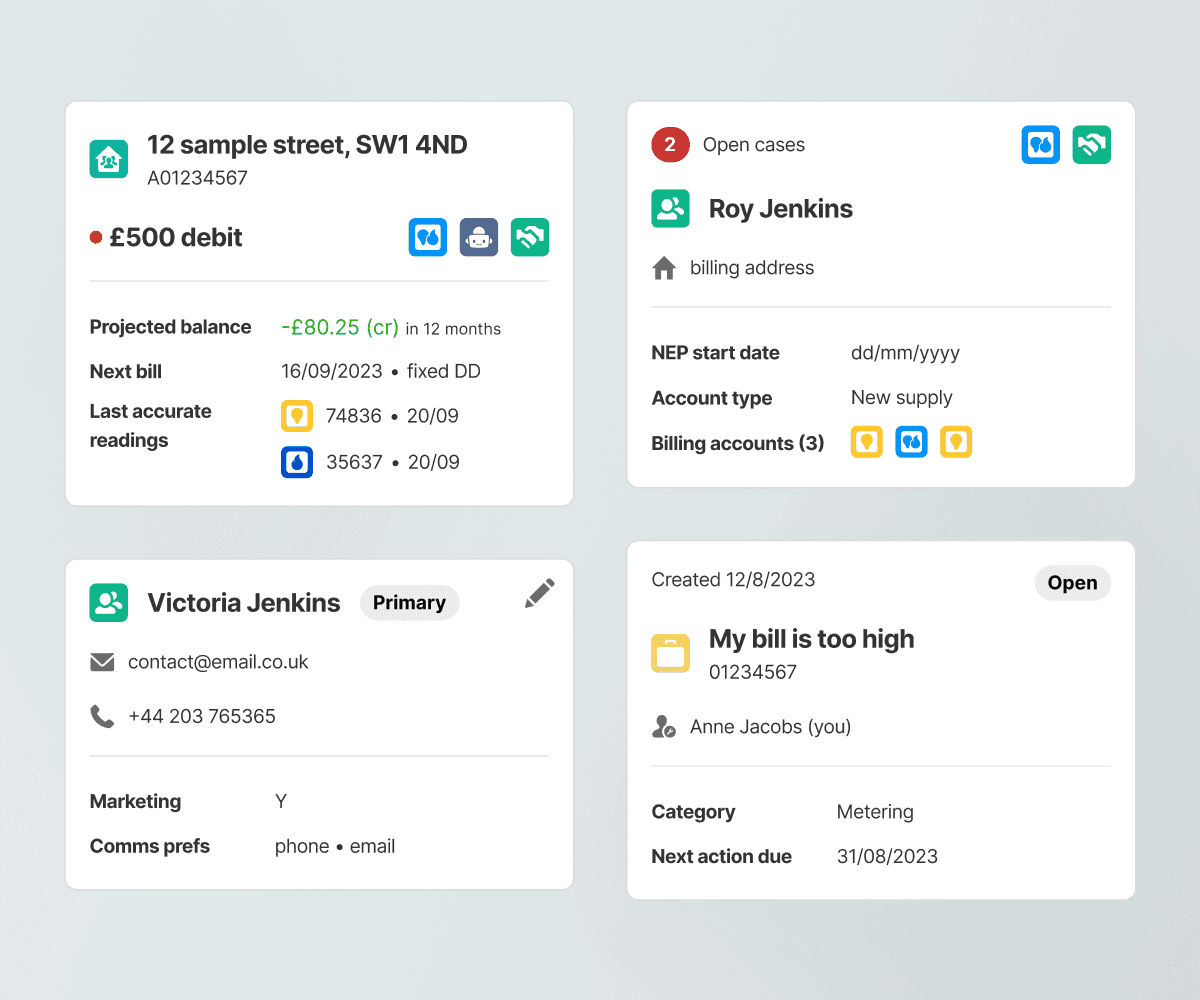
4 object cards

We developed and refined cards that represented each of our 4 major objects: contacts, accounts, service addresses and cases.
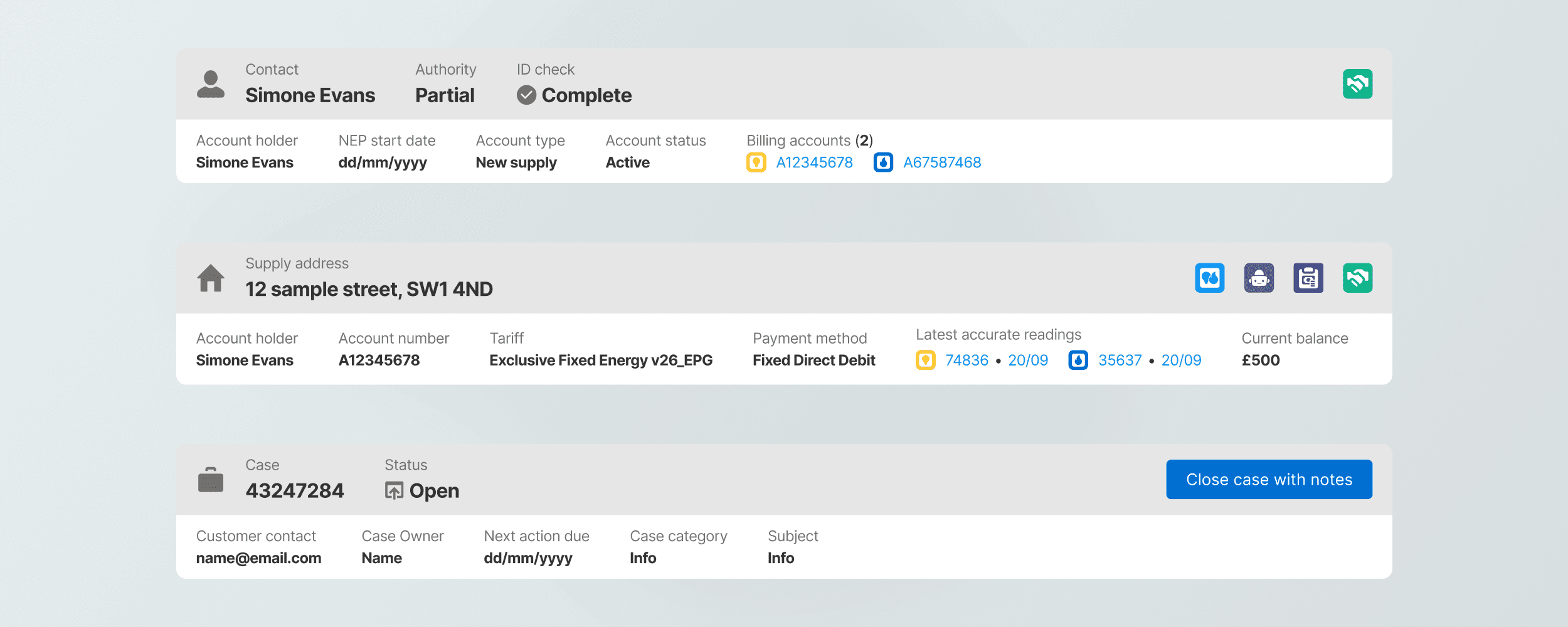
3 toolbars

We refined the 3 major toolbars that would appear in the tool, ensuring they would surface exactly what information agents needed above each key page.

3 toolbars

We refined the 3 major toolbars that would appear in the tool, ensuring they would surface exactly what information agents needed above each key page.

8 billing cards

As the core widgets for billing & metering functionality, these brand new cards had to surface the right info and promote the correct next action.

8 billing cards

As the core widgets for billing & metering functionality, these brand new cards had to surface the right info and promote the correct next action.

8 billing cards

As the core widgets for billing & metering functionality, these brand new cards had to surface the right info and promote the correct next action.

5 insight cards

To accompany our new 'insights' feature, we created a number of quick glance cards that agents would find most helpful.

5 insight cards

To accompany our new 'insights' feature, we created a number of quick glance cards that agents would find most helpful.

5 insight cards

To accompany our new 'insights' feature, we created a number of quick glance cards that agents would find most helpful.

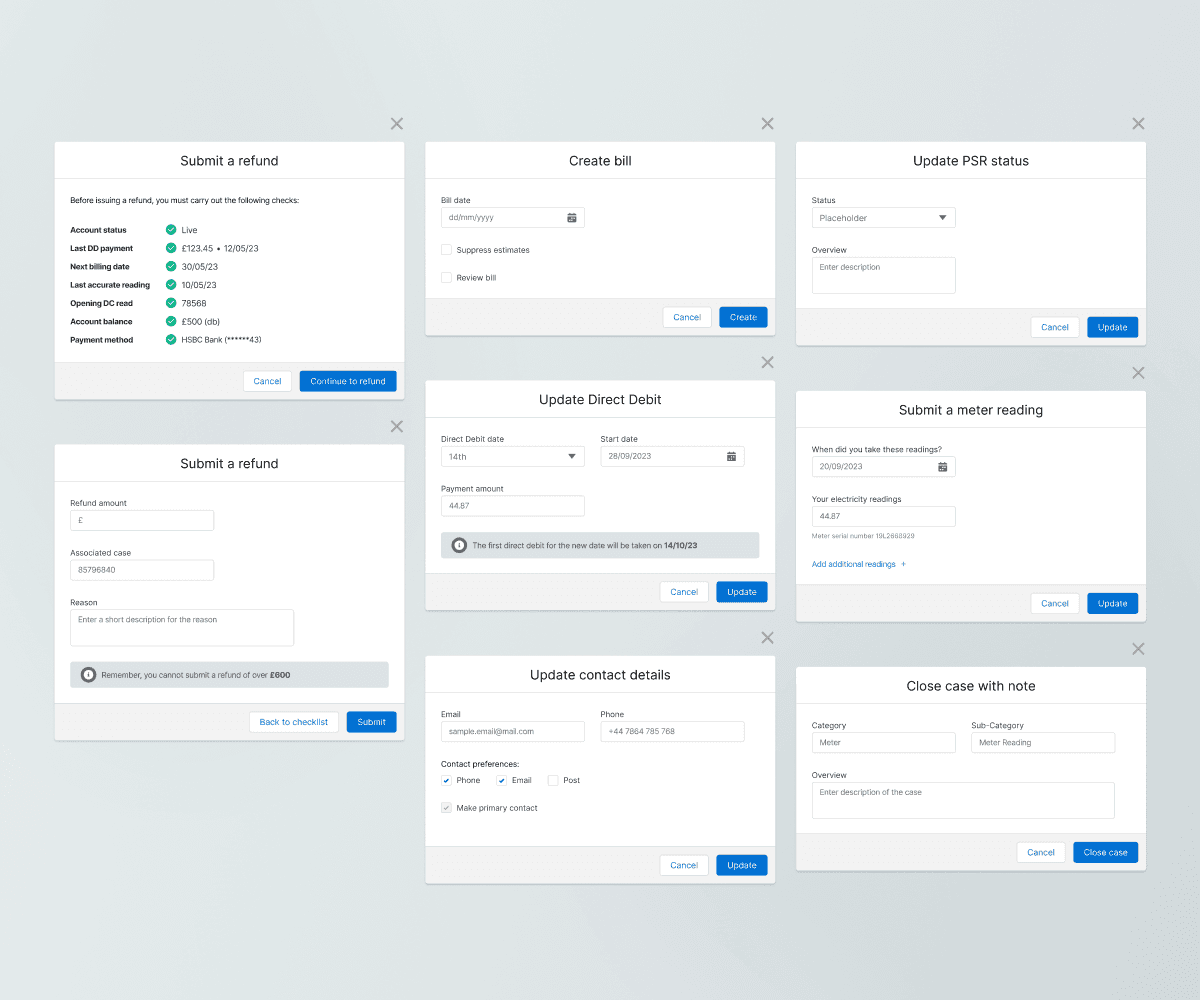
7 action modals

We worked with agents to understand exactly what tasks they would prioritise in the tool and create functions specifically for that.

7 action modals

We worked with agents to understand exactly what tasks they would prioritise in the tool and create functions specifically for that.

7 action modals

We worked with agents to understand exactly what tasks they would prioritise in the tool and create functions specifically for that.

Moderated testing

We also conducted 6 x 40 min testing sessions, each asking agents to complete 1-2 tasks in a mid-fidelity prototype. The aim was to test the true impact of our design on those who will be using them, agents, with the aim of getting accurate and actionable feedback and thus make improvements.

Chapter 9

Impact and feedback

69%

Decrease in time to completion

69%

Decrease in time to completion

100%

Of agents preferred the new method

100%

Of agents preferred the new method

83%

Fewer clicks

Andrew’s contributions were critical to the success of an important initiative with Centrica. His expertise in UX and User Research ensured our designs met the needs of the end user and client goals. The project had significant challenges as we had to balance the constraints of Salesforce, with reported desires of call centre staff, needs of the end customer and the business goals of our key stakeholders.

Andrew demonstrated strong leadership skills, leading client presentations and building their trust in our ability to provide impactful solutions. He also provided mentorship and guidance to more junior designers, creating a supportive team environment.

His proficiency in wireframing and prototyping enhanced our project deliverables, ensuring they were both feasible and functional. Andrew will approach any project at CI&T with positivity and a solution led attitude.

Andrew's collaborative nature and commitment to delivering great work make him a valuable team member. I look forward to working with him again the future.

Get in touch

Reach out and let's build something that really works.

Get in touch

Reach out and let's build something that really works.